- Joined
- Jun 6, 2009
- Messages
- 27
- Reaction score
- 0
Product Standard Yearly
Version Number 18.0 (Build 908)
Windows 10 PC
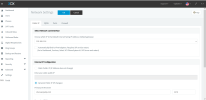
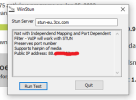
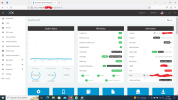
As shown below, IPv4 remains on detection. (red)
But the 3cx server works fine.
My ip address has not (yet) changed, so luckily everything is still going well.
I also replaced the stun servers with non-default servers for testing, but it made no difference.
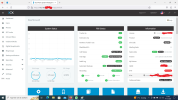
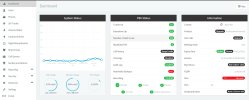
The firewall test shows green, so I don't know where the problem is.
I read something about a new activation server, but my server was activated a long time ago.
Does anyone know where I'm doing something wrong?
Productstandaard Jaarlijks
Versienummer 18.0 (build 908)
Windows 10 pc
Zoals hieronder te zien is, blijft IPv4 bij detectie. (rood)
Maar de 3cx-server werkt prima.
Mijn ip adres is (nog) niet veranderd, dus gelukkig gaat alles nog goed.
Ik heb ook de stun-servers vervangen door niet-standaardservers om te testen, maar dat maakte geen verschil.
De firewalltest geeft groen weer, dus ik weet niet waar het probleem zit.
Ik heb iets gelezen over een nieuwe activeerserver, maar mijn server is lang geleden geactiveerd.
Weet iemand waar ik iets fout doe?
Version Number 18.0 (Build 908)
Windows 10 PC
As shown below, IPv4 remains on detection. (red)
But the 3cx server works fine.
My ip address has not (yet) changed, so luckily everything is still going well.
I also replaced the stun servers with non-default servers for testing, but it made no difference.
The firewall test shows green, so I don't know where the problem is.
I read something about a new activation server, but my server was activated a long time ago.
Does anyone know where I'm doing something wrong?
Productstandaard Jaarlijks
Versienummer 18.0 (build 908)
Windows 10 pc
Zoals hieronder te zien is, blijft IPv4 bij detectie. (rood)
Maar de 3cx-server werkt prima.
Mijn ip adres is (nog) niet veranderd, dus gelukkig gaat alles nog goed.
Ik heb ook de stun-servers vervangen door niet-standaardservers om te testen, maar dat maakte geen verschil.
De firewalltest geeft groen weer, dus ik weet niet waar het probleem zit.
Ik heb iets gelezen over een nieuwe activeerserver, maar mijn server is lang geleden geactiveerd.
Weet iemand waar ik iets fout doe?
Last edited: