Is there an easier way to create holiday ?

Mike Phida

Customer
Joined
Dec 9, 2024
Messages
1
Reaction score
1
Hello everyone,

I'm looking for an easier way to duplicate holiday, i have ~30 dept, and honestly, if there is a way to import/export, it can be a big time saving for me :)

Thanks
 
  • Like
Reactions: EmmettsIT
  • Like
Reactions: Mike Phida
Hello,

this works great for the default department but how to setup this for other departments?
When i try it, doesnt affect and the promt not play, the call goes to the queue...


The queue is member of the Department.


I can only load the promt into the queue the it will play it on holiday, but not in the Office hours / holidays
This will not make sense for me to change every holiday the promt in the queue...

Thanks!
BR Aleks
 
Hello,

this works great for the default department but how to setup this for other departments?
When i try it, doesnt affect and the promt not play, the call goes to the queue...


The queue is member of the Department.


I can only load the promt into the queue the it will play it on holiday, but not in the Office hours / holidays
This will not make sense for me to change every holiday the promt in the queue...

Thanks!
BR Aleks
The script can be applied across all your trunks. It depends if they are assigned to a department, or system wide.

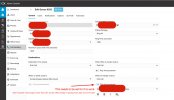
The script is linked to an individual trunk. It will search for a holiday date, see if there is a prompt in the holiday, play it, and then send it through to its original routing. In your queue, you would just have to define the holiday routing. IF you define a prompt here as well it will play this as well.
 
  • Like
Reactions: GregG_3CX
The script can be applied across all your trunks. It depends if they are assigned to a department, or system wide.

The script is linked to an individual trunk. It will search for a holiday date, see if there is a prompt in the holiday, play it, and then send it through to its original routing. In your queue, you would just have to define the holiday routing. IF you define a prompt here as well it will play this as well.
Thanks ok but I only have one trunk.
This trunk points to an IVR. In this IVR the caller can press 1 or 2.

1 and 2 are different departments with different office hours and different holidays with different prompts for each holiday.

How can I solve this so that I don't have to change the announcement in the system every time? is there a solution for this?

BR Aleks
 
In this case, your DId which is bound to the trunk and the Digital receptionist, will trigger the prompt. It will play the holiday prompt and then forward the call to the holiday routing of the Digital receptionist. The digital receptionist should not play the intro prompt but should route the call to where you have defined, whether this is a voicemail, outside number etc.
 
  • Like
Reactions: GregG_3CX
I've tried this with no luck. I've got one department, recieving phone calls from another departments, digital receptionist.

The problem is that this is for 1 store with 2 offices. We need to have different opening hours but same digital receptionist.
Department B has longer opening hours, so we have department B as the default department for the stores digital receptionis, that's where the offices and their specific departments are seperated into 2 Call queues.

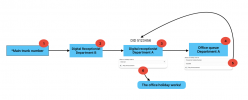
Digital receptionist - Department B
1 Call queue - Department A -Office holiday
2 Call queue - Department B


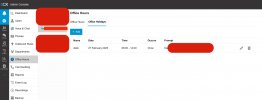
But these settings for department A are not working, I always have to set a specific announcement under the "when on holiday route to" END CALL -> play announcement.
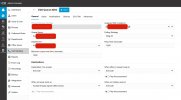
Xnip2025-02-27_11-54-16.jpg


Shouldnt this be enough?
Xnip2025-02-27_11-45-05.jpg

Xnip2025-02-27_11-56-50.jpg
 
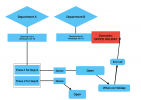
How it should work...

1740658768827.png


Hope it's clear what I'm trying to say in this image! ;)
 
It would depend. Is your SIP Trunk system wide? or department specific?

The script from the holiday prompts is played first, then the call is routed to its destination.

It is intercepted from the trunk directly.
 
It woudl depend. Is your SIP Trunk system wide? or department specific?
System wide in this case, I can change that, should that work?

What should I keep in mind when changin it department specific?
 
Tried Trunk specific but it didn't work..
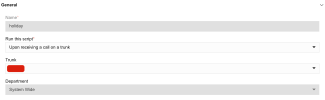
1740659420023.png

and had the DID numbers assigned to the queue in a seperate Trunk..
 
Hello, I have the same problem, my solution is a CFD Script. My only problem now is that the audio file is playing in a loop on holidays so the caller must hang up.
I will try to find a solution for this problem.

i found this script in the forum but i have no link to the page :(
 

Attachments

So I found a solution, this is the way I did it...

no idea how and why this worked though, probably calling the DID contains the prompt in the office holiday(opening hours)..

So the prompt in Office hours -> Department B -> Office Holiday ... Is only prompted if departments DID is pinged.

1740664772036.png

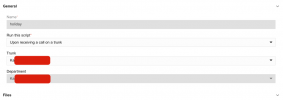
This also worked with system wide settings in the Call script config. Integrations -> Call Scripts ->
1740664398790.png
 
Last edited:
  • Haha
Reactions: sigoskar
The DID is bound to a trunk, so it will trigger the holiday script. The script will see which department that DID is assigned to and play the relevant prompt.
 
  • Like
Reactions: Svanur
Yess, love it, but not in love with it..

If it could just be triggered by the department, so system extention's department has a holiday, boom, holiday prompt override.
 

Forum statistics

Threads
112,328
Messages
591,905
Members
165,483
Latest member
AshleyStokes