- Joined
- Mar 18, 2021
- Messages
- 15
- Reaction score
- 3
I wanted to check if there’s any existing way to increase the Recording Data Archiving retention period beyond 30 days in 3CX.
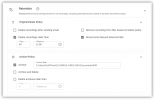
Currently, under Settings → Storage → Data Archiving, the maximum retention value that can be set for recordings is 30 days. For our environment, we need to keep recordings for a longer duration — ideally 90 or 180 days — to meet internal and compliance requirements.
I understand that we can disable automatic cleanup and handle retention manually using external scripts, but before doing that, I wanted to confirm whether there’s any supported parameter, configuration option, or advanced setting that allows extending this limit within 3CX itself.
If not, please consider allowing administrators to set a custom retention period (beyond 30 days) in future updates. This would help a lot for compliance and record-keeping purposes.
Currently, under Settings → Storage → Data Archiving, the maximum retention value that can be set for recordings is 30 days. For our environment, we need to keep recordings for a longer duration — ideally 90 or 180 days — to meet internal and compliance requirements.
I understand that we can disable automatic cleanup and handle retention manually using external scripts, but before doing that, I wanted to confirm whether there’s any supported parameter, configuration option, or advanced setting that allows extending this limit within 3CX itself.
If not, please consider allowing administrators to set a custom retention period (beyond 30 days) in future updates. This would help a lot for compliance and record-keeping purposes.