- Joined
- Apr 27, 2022
- Messages
- 20
- Reaction score
- 4
Hello everyone,
I'm new to 3CX, I recently installed V18 in a Windows 2019 VM. I need help to figure how to set things up, I'll try to describe what I currently have.
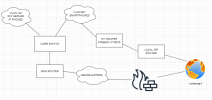
VLAN 118 is where the IP phones reside. The 3CX server has a NIC in this VLAN, and this is where the default GW is configured. This VLAN is part of a corporate network, and it reaches the internet through our headquarter's firewall.
VLAN 901 is an "external" network, in the sense that is has no virtual connection to the corporate network, for security reasons, as we have no strict control over what the users install in their phones. This VLAN uses the same infrastructure as the corporate network, but it has no interface in the core switch so it is essencially firewalled. In this VLAN is where all our corporate smartphones are connected. This VLAN reaches the internet through a local ISP, and in its path there is an old Firebox XTM515 that I use to configure a few rules for what can go in/out of this network.
The 3CX VM has two NICs, one connected to VLAN 118 which is also the default gateway. The other NIC is connected to VLAN 901. What I would like to do is:
- Register phones from both VLANs in 3CX. IP phones in the case of VLAN118 and the 3CX app in the case of VLAN 901.
- Use local ISP/VLAN 901 to register the smartphones into 3CX via 4G when they are not under our WiFi coverage.
- During the initial tests I will not use external SIP trunks, but if we move forward I will probably need to add another NIC to connect to the provider.
Can this be done? Can you provide me some guidance? I will certainly call a partner in the near future but in the meantime I would like to try to get things running in order to gain some experience with the system.
See image below.
Thanks a lot. Regards from Brazil.
Tales Maschio
I'm new to 3CX, I recently installed V18 in a Windows 2019 VM. I need help to figure how to set things up, I'll try to describe what I currently have.
VLAN 118 is where the IP phones reside. The 3CX server has a NIC in this VLAN, and this is where the default GW is configured. This VLAN is part of a corporate network, and it reaches the internet through our headquarter's firewall.
VLAN 901 is an "external" network, in the sense that is has no virtual connection to the corporate network, for security reasons, as we have no strict control over what the users install in their phones. This VLAN uses the same infrastructure as the corporate network, but it has no interface in the core switch so it is essencially firewalled. In this VLAN is where all our corporate smartphones are connected. This VLAN reaches the internet through a local ISP, and in its path there is an old Firebox XTM515 that I use to configure a few rules for what can go in/out of this network.
The 3CX VM has two NICs, one connected to VLAN 118 which is also the default gateway. The other NIC is connected to VLAN 901. What I would like to do is:
- Register phones from both VLANs in 3CX. IP phones in the case of VLAN118 and the 3CX app in the case of VLAN 901.
- Use local ISP/VLAN 901 to register the smartphones into 3CX via 4G when they are not under our WiFi coverage.
- During the initial tests I will not use external SIP trunks, but if we move forward I will probably need to add another NIC to connect to the provider.
Can this be done? Can you provide me some guidance? I will certainly call a partner in the near future but in the meantime I would like to try to get things running in order to gain some experience with the system.
See image below.
Thanks a lot. Regards from Brazil.
Tales Maschio