


- Joined
- Dec 11, 2017
- Messages
- 62
- Reaction score
- 3
I have followed the setup instructions for the new ISO from here https://www.3cx.com/docs/manual/installing-debian-linux-pbx/
After i make it through the setup step 2 line 16 the server installs and then returns to this:
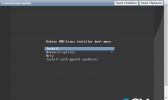
It never goes to the 3cx configurator. The old manual way was so simple and had no problems ever.
After i make it through the setup step 2 line 16 the server installs and then returns to this:
It never goes to the 3cx configurator. The old manual way was so simple and had no problems ever.


