- Joined
- Feb 16, 2024
- Messages
- 48
- Reaction score
- 12
Hi everyone,
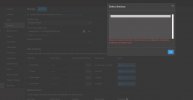
I’m having trouble connecting 3CX Backup to Google Cloud Storage. I’ve already created a GCS bucket, set up the permissions, and exported the Private Key (JSON) to be used in 3CX. However, when I try to select a folder from within 3CX, I consistently get this error message:
Everything appears correctly configured on the Google side (Service Account has Storage Admin and Storage Object Admin roles), but 3CX doesn’t seem to establish the connection.
Then I attempted to use the Google Integration feature instead but it resulted in OAuth errors.
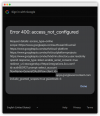
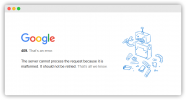
I’m getting the following Google errors (see attached screenshots):
Both seem to happen during the OAuth authentication flow.
I’m having trouble connecting 3CX Backup to Google Cloud Storage. I’ve already created a GCS bucket, set up the permissions, and exported the Private Key (JSON) to be used in 3CX. However, when I try to select a folder from within 3CX, I consistently get this error message:
“Unable to access the directory. Check connection, configuration, credentials, private key, or directory path.”
Everything appears correctly configured on the Google side (Service Account has Storage Admin and Storage Object Admin roles), but 3CX doesn’t seem to establish the connection.
Then I attempted to use the Google Integration feature instead but it resulted in OAuth errors.
I’m getting the following Google errors (see attached screenshots):
- Error 400: access_not_configured
- Error 409: malformed request
Both seem to happen during the OAuth authentication flow.