Solved Issue on attended transfert

Status
Not open for further replies.

luc.jubeau

Platinum Partner
Advanced Certified
Joined
Nov 10, 2021
Messages
42
Reaction score
3
Hello,

We have a client with an issue on attended transfert with desktop app. When they call for the tranfert, the pop-up don't show the join button. There is only transfert and attended tranfert. So they can't transfert the call. We tried to uninstall desktop app and did a new install. The issue was solved but i came back.

Version 18 : 3CX
Desktop OS: Windows 10
Desktop App : 18.10.461
 
To be more detailled :

Yes, we have two choices: attended and Blind.
Firstly, when a call is received, the user chooses attended
Secondly, he calls an another user to be sure that the call could be transfered.
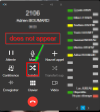
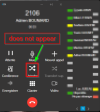
Then, he can't transfer to him because, there is a bug on 3cx Desktop App. The join button does not appear (capture below).

1674722784083.png

We uninstalled Desktop App and reinstalled it. The issue was solved but it came back.
 
If you use the "Nouvel appel" button to call the 2nd person, this counts as a new call.

So it cannot be joined in this case. When transferring, do not user the "Nouvel appel" button.
 
  • Like
Reactions: Evolute IT
To be more detailled :

Yes, we have two choices: attended and Blind.
Firstly, when a call is received, the user chooses attended
Secondly, he calls an another user to be sure that the call could be transfered.
Then, he can't transfer to him because, there is a bug on 3cx Desktop App. The join button does not appear (capture below).

View attachment 33732

We uninstalled Desktop App and reinstalled it. The issue was solved but it came back.
You need to use "Transfert sup." and not "Nouvel appel" like John said. Otherwise the app does not know about the expected join.
 
  • Like
Reactions: JohnS_3CX
Thanks for your answers but i explained again with detailled capture

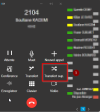
Firstly, when a call is received, the user chooses attended

1675093834339.png
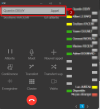
Secondly, he calls an another user to be sure that the call could be transfered.
1675093940509.png
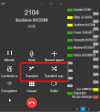
Then, he can't transfer to him because, there is a bug on 3cx Desktop App. The join button does not appear (capture below).

1675094026070.png 1675094091995.png

Thanks for your returns
 
Secondly, he calls an another user to be sure that the call could be transfered.
How exactly does the user call the 2nd person? This might be the small detail that makes all the difference
 
  • Like
Reactions: Evolute IT
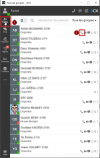
he uses this window :

1675096827160.png

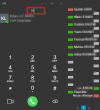
but sometimes, enter letters in this one and select the user :

1675096985189.png

the issue is the same
 
he uses this window :

View attachment 33796

but sometimes, enter letters in this one and select the user :

View attachment 33798

the issue is the same
a) The first method is a guaranteed failure - always. This method is not supported by the client, please instruct the user not to do it this way.

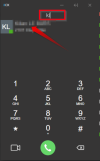
b) The second method should always work - and by this I mean you need to first click Attended Transfer, then type inside the dialer window, and when the correct user appears you click on them like my arrow shows below.
1675154289970.png
 
hi,

Thanks John. My users are grateful for your answer. The issue is solved.

I'm joining them to thank you.

You could close this thread.
 
  • Like
Reactions: JohnS_3CX
Happy to be of help Luc!
 
  • Like
Reactions: luc.jubeau
Status
Not open for further replies.