Issue with 3cx & Nexmo.

Status
Not open for further replies.

JesseN8WDH

New User
Joined
Jan 19, 2022
Messages
3
Reaction score
0
Hi 3cx Community,

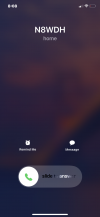
I have a 3cx server hosted locally via the Debian ISO, My sip provider is Vonage/Nexmo, I can make outgoing calls perfectly fine but when I make incoming calls it shows that the line is busy, I know Nexmo isn't a supported Provider with 3cx but that's what I was suggested, I have run the firewall test via the 3cx dashboard and everything passed, I have included photos for the people that need them. Can someone please help!? I have working on this for near a week now and its getting frustrating and confusing


Thanks a ton,
Jesse
 

Attachments

  • IMG_1643.PNG
    IMG_1643.PNG
    648.4 KB · Views: 7
  • user-busy.png
    user-busy.png
    451.5 KB · Views: 7
  • Screenshot 2022-01-18 201812.png
    Screenshot 2022-01-18 201812.png
    7.6 KB · Views: 6
Hello @JesseN8WDH

The first thing you need to do is figure out if the calls are reaching your PBX or not. You can check the call log for this or the activity log and search for the call. If the call is hitting your system then you need to look at the destination of the call and troubleshoot that.
If the call is not hitting the system however then there is nothing to do in 3CX and will need to speak with your provider to see where the calls end up.

Let us know what you find
 
Hello @JesseN8WDH

The first thing you need to do is figure out if the calls are reaching your PBX or not. You can check the call log for this or the activity log and search for the call. If the call is hitting your system then you need to look at the destination of the call and troubleshoot that.
If the call is not hitting the system however then there is nothing to do in 3CX and will need to speak with your provider to see where the calls end up.

Let us know what you find


Hi! It looks like calls may not be reaching 3cx, I'm not 100% sure though. If it's not hitting the PBX how do I resolve the issue?
 
Hi! It looks like calls may not be reaching 3cx, I'm not 100% sure though. If it's not hitting the PBX how do I resolve the issue?
You need to check if the calls are hitting the firewall as a first step. Then if they are not then you need to speak with your provider to sort things out. If the calls are making it to the firewall then its a matter of sorting out your firewall rules.
 
You need to check if the calls are hitting the firewall as a first step. Then if they are not then you need to speak with your provider to sort things out. If the calls are making it to the firewall then its a matter of sorting out your firewall rules.
1642616018465.png


This is poping up when I run a firewall test, all the required ports are open. I am using a Technicolor Residental Modem/Router if that may be a cause, Im running my server out of my house though so I don't have access to a Business Grade Connection.
 
The firewall checker passing doesn't mean much in this scenario because if the calls are not reaching your firewall/modem then it's irrelevant.

I would recommend running a packet capture from the management console (Dashboard / Activity Log / Capture) and while its running making a call to the system. When that fails, stop and download the capture and look from traffic from the IP of the provider. You are mainly looking for an Invite message. If there isn't one then you need to speak with your provider.
 
Status
Not open for further replies.

Forum statistics

Threads
112,326
Messages
591,901
Members
165,479
Latest member
Senergia