- Joined
- Mar 22, 2019
- Messages
- 9
- Reaction score
- 0
Hello,
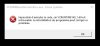
We encounter a problem when we want to install the 3CXWMRemoteControlSvc package.
The program can't start because VCRUNTIME140.dll is missing from your computer
I can work around the problem by installing the latest C++ 2019 runtime package manually.
My question is: why don't you include the package in your installer? Or prevent that the c++ 2019 runtime package is missing as a prerequisite?
Regards,
We encounter a problem when we want to install the 3CXWMRemoteControlSvc package.
The program can't start because VCRUNTIME140.dll is missing from your computer
I can work around the problem by installing the latest C++ 2019 runtime package manually.
My question is: why don't you include the package in your installer? Or prevent that the c++ 2019 runtime package is missing as a prerequisite?
Regards,