Issue with Admin Login After Upgrade

emil19

SOHO User
Joined
Mar 11, 2025
Messages
3
Reaction score
0
Hello,

We are experiencing an issue logging into our Owner account in the Admin Panel. Before the update, the login link was: https://192.168.x.xx (accessible only from the internal IP). However, after upgrading from version 18 to version 20, the link has changed to https://xxxx.3cx.ro/#/login.

Previously, we used to log in with the "3cxadmin" account on https://192.168.x.xx, which was our Owner account. Now, it seems that we no longer have any functional account with the username "3cxadmin" (attached is a screenshot of the error message).

We also attempted to reset the password using the "Forgot Password" option, but nothing happened, even after entering "3cxadmin" or our email address.

Have you encountered this issue before? Please let us know how it was resolved.

Thank you!
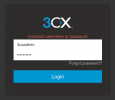
 

Attachments

  • unnamed.png
    unnamed.png
    31.9 KB · Views: 5
Are these the root credentials you are trying to log in with from V18? If so, root credentials are no longer a thing. Prior to the update you should have created a user account and set it as a system owner and created a password.
 
  • Like
Reactions: IrinaP_3CX
Are these the root credentials you are trying to log in with from V18? If so, root credentials are no longer a thing. Prior to the update you should have created a user account and set it as a system owner and created a password.
Thanks for the answer. Yes, I believe these are the root credentials. In case we haven't assigned an Owner Account, what would be the next steps in this situation? For now, we only have the Manager and Department Administrator roles active, but our Admin Panel is very limited.
 
Thanks for the answer. Yes, I believe these are the root credentials. In case we haven't assigned an Owner Account, what would be the next steps in this situation? For now, we only have the Manager and Department Administrator roles active, but our Admin Panel is very limited.
You cant upgrade without an owner account. If you dont know your owner account, take an backup and have a look into the xml file for system owner.
 
You cant upgrade without an owner account. If you dont know your owner account, take an backup and have a look into the xml file for system owner.
Hello, thank you for your response. In order to download the backup, I need to be logged into the Owner account. The option is not available when using an account with the Manager or Department Administrator role. I also tried resetting the password using the email address associated with the Owner account, but I did not receive any email on that address.
 
Than take any older backup from before the upgrade and check there.
 
I have a similar problem, I have a local installation on Windows, I updated from version 18 to version 20. I restored the data from the backup, but when logging in to the system owner's account I get information that the username or password is incorrect, even though the data is correct. On version 18 I logged in using the admin account and password, in version 20 using the email address and password. I tried to change the password using reset, but resetting the password is out of the question, because emails from the administration panel are not sent. I created a new configuration file on the test version v20 on another server, I made a backup. I edited and compared the xml files from v18 and v20, the login parameters are set similarly. In v20 there are no WEBSERVERHASH and WEBSERVERUSER parameters responsible for logging in using the administrator's name. Maybe someone knows exactly what else I can check or change, what exactly are the parameters responsible for logging in to be able to restore the data from the backup and log in to the administration panel?
 
Hello @Exim_AM

The original advice in v18 to log in to the web client as the system owner with an email address or extension number before the upgrade is now too late.The recommended preparations for the upgrade were apparently not followed.

You can also log in to v20 using the extension number instead of the system owner's email address. Is that at least possible?

Alternatively, you can also modify the last v18 backup so that the system owner can log in. Or - if the v20 system is running - you can temporarily set a known password for the system owner using Windows Powershell. There are examples of both in the forum to resolve the login issue.

For the backup:
https://www.3cx.com/community/threads/cant-login-after-v20-upgrade.129671/post-617179
 
Last edited:
  • Like
Reactions: bitn2
Hello @Exim_AM

Yes, I can take a look, but I'd prefer if you solved the problem yourself. I've given you several helpful hints. Maybe the IP of your admin PC is now blacklisted.

Question: Is the PBX still running? Can you make phone calls, etc.? Is it just the administration login that's not working?

If so, replace the system owner's password as described and log in with their extension number and password.

Otherwise: You can also create, modify and restore 3CX backups under Windows, outside of the 3CX administration, using the command line.
C:\Program Files\3CX Phone System\Bin\BackupCmd.exe and
C:\Program Files\3CX Phone System\Bin\RestoreCmd.exe are your friends.
Change SERVICES_ACCESS_HASH for the system owner as described in my link above.

You can also check the 3CX services that should be running under Windows.

You can also connect directly to the 3CX database under Windows and read (and - forbiddenly - write when all 3CX services except DB server are down) data there, example:
SQL:
psql.exe -d database_single -h 127.0.0.1 -p 5432 -U phonesystem -c "select usv.dn, usv.display_name, usv.iddn, dnp.name, dnp.value from users_view as usv, dnprop as dnp where usv.iddn=dnp.fkiddn and dnp.name='SERVICES_ACCESS_HASH' and usv.dn='100';"

Acces data are in C:\ProgramData\3CX\Bin\3CXPhoneSystem.ini: DBName, MasterUser, MasterDBPassword

You may also look here and use a translator:
https://www.3cx.de/forum/threads/adminzugang.121493/post-439234

So many possibilities ...

If all fails, simply reinstall and start over. A new day, a new life. :)

btw.: Your nickname suggests that you're familiar with Linux systems, but your 3CX runs under Windows? Are you aware that an ENT license is required for a Windows 3CX?
 
  • Like
Reactions: Exim_AM
Finally, after long, troublesome actions and your indispensable help, it worked. I managed to log in with the number of the system owner. Thank you very much for your help. :)

I've had this installation on Windows for years. It has never failed me, which is why it is still like this. However, I really need to find some time and transfer it to a Linux virtual machine.
 
  • Like
Reactions: fxbastler
Hello,


We are experiencing the same issue described below after upgrading from version 18 to version 20.


Previously, we accessed the Admin Panel via the internal link (https://192.168.x.xx) using the "admin" account, which was our Owner account. However, after the upgrade we can no longer log in using "admin".


We also tried using the "Forgot Password" option, but nothing happened — even after entering the username or email address.


Could you please assist us in resolving this issue? We appreciate any support you can provide.


Thank you!
 
Hello @mGO Consulting ,

As long as you followed the upgrade guide, the extension you set as Owner should be able to login with its previous password and either the extension number or email as username. "admin" as an account does not exist in V20.
 
Hello @KyriacosS_3CX
By mistake, the person who did the upgrade did not configure the "System Owner", at this moment we do not have access to the portal, we only have access via ssh.
 
Did you make a backup before the upgrade, as per the guides? The in-build upgrade should not had let them proceed without a system owner. Perhaps in the backup some other account is listed with that privilege level?
 
I have the backup for both version 18 and version 20, I went to validate in the database and I have the user admin as system owner, I still do not have access to the portal
 
You cannot log in as “admin,” you need to use an extension number or that extension’s email.
 
I've already tested both options but it's still the same.
 
So you are trying to login with an extension xxxx marked as system owner or the email associated with that?
 
I've already tested both options, but it still doesn't work.
 
Hello @KyriacosS_3CX
By mistake, the person who did the upgrade did not configure the "System Owner", at this moment we do not have access to the portal, we only have access via ssh.
So, do you have a system owner set up or not? Not 100% clear.