- Joined
- Jul 14, 2019
- Messages
- 4
- Reaction score
- 0
We have a 3cx v16.2 instance in Azure ( Deployed via Azure Marketplace) connecting to CenturyLink
added the 9000-10999_UDP Rule into Azure
we have followed the instructions at https://www.3cx.com/docs/centurylink-business-sip-trunk/
and the Trunk Registers
but we cannot call out -
Activity Log shows -
08/05/2019 1:13:07 PM - Call to T:Line:10000>>[REDACTED]@[Dev:sip:[REDACTED]@voip.centurylink.com:5100] from L:2.1[Extn:906] failed, cause: Cause: 408 Request Timeout/INVITE from local
08/05/2019 1:13:07 PM - [CM503003]: Call(C:2): Call to <sip:[REDACTED]@65.149.36.87:5100> has failed; Cause: 408 Request Timeout/INVITE from local
i can call the Trunk Pilot Number and DID and it goes to my extension i can hear the external caller but external caller cannot hear me
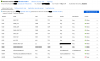
attached is the nsg for the Azure VM
added the 9000-10999_UDP Rule into Azure
we have followed the instructions at https://www.3cx.com/docs/centurylink-business-sip-trunk/
and the Trunk Registers
but we cannot call out -
Activity Log shows -
08/05/2019 1:13:07 PM - Call to T:Line:10000>>[REDACTED]@[Dev:sip:[REDACTED]@voip.centurylink.com:5100] from L:2.1[Extn:906] failed, cause: Cause: 408 Request Timeout/INVITE from local
08/05/2019 1:13:07 PM - [CM503003]: Call(C:2): Call to <sip:[REDACTED]@65.149.36.87:5100> has failed; Cause: 408 Request Timeout/INVITE from local
i can call the Trunk Pilot Number and DID and it goes to my extension i can hear the external caller but external caller cannot hear me
attached is the nsg for the Azure VM