issue with "PBX Delivers Audio", any suggestions?

Status
Not open for further replies.

cn_HsYsTedwOrds

Free User
Joined
Oct 19, 2021
Messages
10
Reaction score
1
I need you guys' help about "PBX Delivers Audio"

I got two 3cx deployments

the 1st one (s1), located on m$ Azure (in USA), version: 18.0 Update 1 (Build 234)
as the contrast, the 2nd one (s2), in one cloud service located in China, version: 18.0 (Build 1880)


and I have two SIP boxes (same application on them, and in same LAN), in China; with all User accounts in 3cx dashboard enabled the "PBX Delivers Audio" option

so, here is the network diagram (alice & bob in same LAN, both two 3cx server got its public IP):

Code:
alice                  3cx                  bob
  │                     │                    │
  │        RTP          │                    │
  ├───────────────────> │                    │
  │ <───────────────────┤                    │
  │                     │       RTP          │
  │                     │ <──────────────────┤
  │                     ├──────────────────> │
  │                     │                    │


the current issue are: for server s2(in China), alice & bob can transfer RTP packets to each other via 3cx relay server

however, for server s1 (m$ Azure in USA), only RTP flow from SIP box to 3cx, no any RTP packets flow from 3cx to SIP box, that is (via captured packets using tcpdump)

Code:
alice                  3cx                  bob
  │                     │                    │
  │        RTP          │                    │
  ├───────────────────> │                    │
  │ <─────────X─────────┤                    │
  │                     │       RTP          │
  │                     │ <──────────────────┤
  │                     ├─────────X────────> │
  │                     │                    │


you guys got any suggestions? Thanks so much.
 
HI @cn_HsYsTedwOrds

So you have 2 different installations with different users on them and one works and the other does not? Is that correct?
What does SIP boxes mean? Where are the users located? Did you run the firewall checker on the installation that has the issue to see if everything is OK?
Also are the users using a 3CX client to make calls or are you using SIP phones?
 
Hi @YiannisH_3CX

So you have 2 different installations with different users on them and one works and the other does not? Is that correct?
Yes, correct
What does SIP boxes mean? Where are the users located? Did you run the firewall checker on the installation that has the issue to see if everything is OK?
SIP box means a device with Sip function enabled, running Android system.
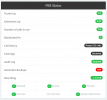
Users located in China. the firewall checker already checked pass
Screenshot from 2021-10-19 14-59-17.png

those tests all executed on SIP phones, not 3cx client App
 
The first step to troubleshoot your issue is to install 2 3CX clients and try a call using those and see if there is audio. If there is then its probably a firewall issue at the site the users are located. If not then we can start looking elsewhere. Also try calling *777 and see if you hear yourself. *777 is an echo test build in the PBX that enables you to check if there is 2 way audio between your extension and the PBX.
 
  • Like
Reactions: [email protected]
I just checked, both the 3cx client App & my SIP phone can hear voice from peer, for the time being
and I also ran the *777 echo test, it also can pass, for now

I will re-check the issue then, thanks YiannisH
 
  • Like
Reactions: YiannisH_3CX
currently, my two Sip phones (in China) can not transfer RTP packets to one of my 3cx server (also in China), means neither two phone can't hear voice from each other

Code:
alice                  3cx                  bob
  │                     │                    │
  │        RTP          │                    │
  ├───────────────────> │                    │
  │ <─────────X─────────┤                    │
  │                     │       RTP          │
  │                     │ <──────────────────┤
  │                     ├─────────X────────> │
  │                     │                    │

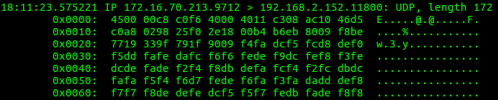
I have captured a network dump in server

like alice's peer RTP port is 9712 (captured from alice's sdp body), then I also capture in server using

Code:
sudo tcpdump -i eth0 udp port 9712 -w s.cap

to see whether any packets from alice to server, proved flow like this
Screenshot from 2021-10-21 18-18-30.png

1. why the dest ip is alice's LAN ip (192.168.2.152), but not alice public ip? ( as the contrast, I also captured a successful SIP communication from m$ Azure server, which shows the dest IP is alice's public IP)

2. the direction shows that packets is from 3cx to alice, means the 3cx server is transfering packets from bob to alice, correct?
which in turn means that at least bob's RTP packets successfully received by 3cx first, then 3cx can transfer them back to alice one by one, but no such evidence from capture file between 3cx and bob, why? (which also only got packets from 3cx to bob, like alice's)

thanks y'all
 
I also tried to dial *777 (the echo test), no any sound
 
I think you might need to contact a 3CX partner to assist you with troubleshooting as you will need logs and packet captures as well as your network topology to figure out where the issue is.
 
thanks dude, i will consider about it
 
Status
Not open for further replies.

Members Online Now

Forum statistics

Threads
111,832
Messages
589,283
Members
164,662
Latest member
DejanMDS