Issue with SMTP validation

Status
Not open for further replies.

gregory.b

Silver Partner
Basic Certified
Joined
Sep 28, 2020
Messages
101
Reaction score
6
Hello, i have an issue with the SMTP of 3CX.

I got a client on V18 update 9 build 31. With the following error down below
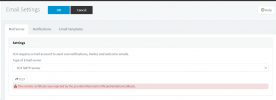
1721113715906.png


I also did a Shopper SSL Certificate test and got the following result
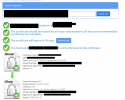
1721131080150.png


I want to upgrade the system to V20 But i don't know if i can because of this issue.

As if Mail doesn't work how will i register my extension not that 3CX is install on Client SITE.
Please help
 
If using 3CX smtp then this is likely a firewall / content filter issue.
 
Okay so it can be the port 587 that is blocked on the firewall ?
 
Given the certificate validation failure, I would think more the content filter bit than firewall, I said firewall / content filter as they're usualy one device - I should have been more clear.
 
Hi,

There was SSL inspectation check.

However the Network Administrator has added the smtp-proxy.3cx.net in the exception field as per requested by 3CX Support Technician team.
But the issue still remains we still get the same error message.
I also tried with a Custom SMTP and also having this message of : The remote certificate was rejected by the provided RemoteCertificateValidationCallback.
Can someone advise as i can't upgrade my 3CX because of that.

And i can't find the solution or the next step to test.


I also did a Firewall test on the 3CX and the Firewall is green
 
Are you using a custom FQDN or the 3CX FQDN?
 
Open a ticket with 3cx to check further...
 
Is the 3CX PBX installed on Windows or Linux?
If it's a 3CX-provided FQDN, it strongly suggests that the issue lies with the firewall.
What is the make and model of your firewall?

In your firewall, ensure that there are no security profiles applied to the 3CX PBX traffic.
Example (Please disable):

- Antivirus
- Web Filter
- Application Control
- IPS
- DLP Sensor
- ICAP
- Web Application Firewall
- SSL Inspection: No-Inspection

To proceed with the next steps troubleshooting,
I need the answers to my 2 previous questions.
 
@gregory.b Might be a long shot but it just so happens that you will get that exact message if your 3CX host date is incorrect. Might be worth checking it.

If it's Debian you can check from the "Management Console > Dashboard > Terminal" and just type "date". Otherwise you should be able to tell from the logs or just connect to the OS directly.
 
Status
Not open for further replies.

Forum statistics

Threads
111,953
Messages
589,914
Members
164,849
Latest member
BillyAkansel