Issues after Yealink firmware update

Status
Not open for further replies.

TigerTech

Forum User
Joined
May 1, 2018
Messages
55
Reaction score
9
Running 3CX 16.0.8.9 on the Debian appliance. I recently noticed that our Yealink T46S's were showing "Not Supported 66.85.0.5", and so I updated a couple of them to the 3CX-provided version, 66.86.0.5.

The first thing we noticed is that the ringtone for calls from the outside changed. I've searched the forums here, and I've found references to a new 3CX template that is supposed to correct this. I saw mention of template version 109361, but our system is offering only 109356. (The only 3CX update we're being offered at the moment is to 18 Alpha.)

The second change is that I'm no longer able to get to the Phone UI of the updated phones. The un-updated T46S's are still accessible, but when trying to get to the updated ones the browser prompts for a username and password. I tried logging in with the ID and Password on the extension's Phone Provisioning page, but they don't work. Because of this I'm of course stopping any further firmware updates.

A minor side question... I recently purchased a couple of new T40G's, and the firmware is newer than what 3CX supports (76.84.0.125 vs. 76.84.0.95). I'm assuming that this is no big deal, and eventually 3CX's firmware support will catch up?
 
Running 3CX 16.0.8.9 on the Debian appliance. I recently noticed that our Yealink T46S's were showing "Not Supported 66.85.0.5", and so I updated a couple of them to the 3CX-provided version, 66.86.0.5.

The first thing we noticed is that the ringtone for calls from the outside changed. I've searched the forums here, and I've found references to a new 3CX template that is supposed to correct this. I saw mention of template version 109361, but our system is offering only 109356. (The only 3CX update we're being offered at the moment is to 18 Alpha.)

The second change is that I'm no longer able to get to the Phone UI of the updated phones. The un-updated T46S's are still accessible, but when trying to get to the updated ones the browser prompts for a username and password. I tried logging in with the ID and Password on the extension's Phone Provisioning page, but they don't work. Because of this I'm of course stopping any further firmware updates.

A minor side question... I recently purchased a couple of new T40G's, and the firmware is newer than what 3CX supports (76.84.0.125 vs. 76.84.0.95). I'm assuming that this is no big deal, and eventually 3CX's firmware support will catch up?
Hi,

Are you using custom templates on your system?
 
If you can still http/https into the phone you can try pulling the rom files manually - I had to do this for a few eBay bought phones for a client.

https://support.yealink.com/documentFront/forwardToDocumentDetailPage?documentId=143#frnotes

Also try admin:admin for failed phones - there may also be an SSL cert issue in browser.
Is it possible/supported to downgrade Yealink ROMs? Still, without being able to sign in to a phone's web interface I don't know how I would do that. Admin/admin does not work. Can someone tell me where the credentials are in 3CX that are supposed to be valid? As I said I manually tried entering the ID and Password from the Phone Provisioning page, but that combo doesn't work.
 
@TigerTech Are you using custom templates on your system?
 
Hi,

Are you using custom templates on your system?
We are using custom templates for critical BLF and multicast settings that unfortunately seem to be impossible to set within 3CX. We haven't changed those settings since we began using 3CX a few years ago, and I have no idea how they might suddenly affect the ability to log into a phone's UI. Our custom template for these phones is based on supported template version 109356.

As for the ring tone, an admittedly minor issue compared with being unable to log into a phone's UI, can you confirm that that should be fixed with template version 109361 or higher? If so, can you perhaps explain why our 3CX install has only 109356 with no updates being offered? I'm looking at the supported 3CX template, yeaklinkT4x.ph.xml.
 
The reason I asked is because I know there are fixes for those issues, and you mentioned that you did not receive any templates updates which is typical when someone has custom templates.

Custom templates do not get updates, you need to maintain them yourself so here is what I would suggest:

1. Delete one of those phones from an extension and press OK
2. Factory reset it, then assign it automatically to the extension again (it will use our template by default)
3. Now go to your updates section and a template update will appear (v109361). Click to install it.
4. Now reprovision your phone and test it to confirm the ringtones issue has been resolved

You may now use this new template as the basis for your custom one, and add your customizations on top.

Always remember:
- when using custom templates, you need to keep them updated yourself, there is no 3CX support

- the system will not show the new update if there isn't at least 1 device using that template assigned to an extension (devices using the custom template do not count). You can overcome this if you create a dummy T46S under your extension using the default template (ie with fake MAC 000000000000)

As for the login button not working this is due to some changes that happened in the firmware and web browsers now being more strict. In V18 there will be an update that addresses this too. Your solution for that now is to not use the PhoneUI button, just type the IP directly into your browser and you will see the T46 login screen. Now it will accept the credentials.
 
66.86.0.5 is what I put on just put on my phones to stop them showing up in red in 3cx phones list.. if you click into phones you should 100% be able to get back into the web interface of each phone - forget admin:admin that I've suggested earlier - that only works from a factory reset....

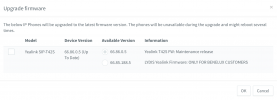
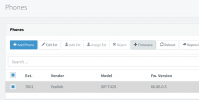
It's via this interface:
Screen Shot 2021-06-15 at 8.57.53 AM.png

And these were my firmware options

Screen Shot 2021-06-15 at 8.59.51 AM.png
And even when I did it by hand 3cx asked still if they were to be "updated"
I had a firmware struggle a bit myself then
admin:<phone password from phone list eye icon> got me into my T42S phones after saying yes to a bunch of certificate errors/warnings in Chrome.
However I am running v18
In the Phones list i hit this "eye" icon
Screen Shot 2021-06-15 at 9.10.26 AM.png
It brings me to a 4 line pop-up page with the phone password on it, not same as the provision password, it's right at the end of the MAC address in the phones list (this is what helped me)

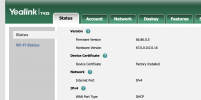
Then I can log in local and play with this interface:

Screen Shot 2021-06-15 at 9.14.56 AM.png


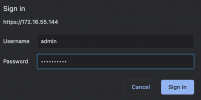
Most important thing is username is still "admin" while the password you collect via the eye icon -> phone password, that should in theory get you into the web interface of the the phone. If you don't get that right the phone will tell you it's not allowing you to log in for the next 7 minutes or etc...

So its this: admin + pw from the eye icon list for phone password.
Screen Shot 2021-06-15 at 9.10.54 AM.png

Hope this helps at all, please excuse if it does not.
 
Last edited:
This might be a bit off topic @dkdocks because issue in this case was that this PBX had custom templates, so 3CX was not offering the new templates. And the new firmware was not working correctly on the older templates causing wrong ringtones to play
 
This might be a bit off topic @dkdocks because issue in this case was that this PBX had custom templates, so 3CX was not offering the new templates. And the new firmware was not working correctly on the older templates causing wrong ringtones to play
True, agreed - but the OP did mention he had trouble logging back into the phones web interface, for whatever reason - to do "anything" with the units.
So I tried to offer first hand knowledge of logging into a T4.. phone after it's been married to 3cx.
It took even me a bit of time to realize the username was not auth-user, but "admin" and pw seen in phone list and not provision pw.
 
The reason is again due to the new firmware but only when using the 3CX V16 "Phone UI button", not when logging in directly. this will be addressed in V18. I just wanted to avoid going off topic so we can better assist @TigerTech
 
The reason I asked is because I know there are fixes for those issues, and you mentioned that you did not receive any templates updates which is typical when someone has custom templates.
...
Thanks to everyone for their replies. I believe that things are resolved here, at least as much as possible for now. Here's a summary:
  • I created a dummy extension and added our various phones to it using the original, supported 3CX templates. This did indeed cause the updated Yealink T4x templates to become available under Updates. I installed the new template and updated our custom template. The ringtone is now back to normal on our T46S's with current firmware.
  • I understand that the inability to get to the T46S's web interface via the 3CX "Phone UI" button is a known issue caused by the latest Yealink firmware. I also understand that it is expected to be fixed in 3CX 18.
  • I can now get to the web interface of those updated T46S's. When the phone's UI asks for username and password I use "admin" for the username and the "Phone Web Page Password" from the "Phone Provisioning" page.
Finally, I'd appreciate it if @JohnS_3CX would address the last question from my original post... Our newly purchased T40G's have firmware newer than what 3CX currently supports. May we expect that support to catch up in the foreseeable future?
 
Hi @TigerTech

Glad to hear the ringing issue was sorted. Regarding the T40G, we would recommend to install the 3CX provided version, because the one you have now has not been interop-tested and we cannot really know if there will be any issues.

Generally speaking now, for the version catching up, this is entirely up to Yealink and their product cycle. If they deem it necessary they should release a newer version, or it could be the last one - hard to say. Once a product reaches a stable point the firmware releases tend to slow down or stop altogether once it reaches EOL. So this is more of a question geared towards manufacturers than 3CX.
 
Generally speaking now, for the version catching up, this is entirely up to Yealink and their product cycle. If they deem it necessary they should release a newer version, or it could be the last one - hard to say. Once a product reaches a stable point the firmware releases tend to slow down or stop altogether once it reaches EOL. So this is more of a question geared towards manufacturers than 3CX.
I'm afraid you misunderstand the situation with our T40Gs - it's rather the exact opposite. Two T40Gs we just purchased came from the factory with firmware version 76.84.0.125 (released by Yealink on 2020-03-16). 3CX currently supports only version 76.84.0.95. So the question is when, if ever, we can expect 3CX to support that firmware that Yealink released well over a year ago. Has 3CX stopped supporting the T40G, or has it perhaps just failed to note that firmware update? Manufacturers, of course, generally do not recommend downgrading firmware on their products.
 
Sorry , I will give it another go! So let's recap :)

1. It's reasonable that when you buy new phones they will come with the latest firmware that the factory was using at that time (main Yealink firmware)

2. This means that you may buy phones with newer FW that what 3CX support (Yealink's 3CX version of the FW). You should be able to downgrade just fine especially for minor versions. and become supported by 3CX.

3. Like I said above, it's not up to 3CX to decide this. We do not produce the firmware. Yealink makes the hardware and the firmware, so they will decide whether they release a newer version.

To conclude, when Yealink decides to release a newer version for 3CX, then we will make it available for our customers. If they do not, then 76.84.0.95 will remain the latest version that 3CX Supports, and that is the one you should install on your phones regardless if they came with a newer version from the factory.
 
@TigerTech - If I can add my observation - it seem Yealink 3CX vetted/certified firmware versions they're not their latest and disconnect by version iteration usually from the default factory site completely - I'm certain they have other version numbers for other big carriers like Verizon FIOS or that EU Bank specific firmware that Yealink made.

So the firmware versions on here for the T40G "retail" you'll see version IDs like 76.84.0.90 and 76.84.0.125 -> https://support.yealink.com/documentFront/forwardToDocumentDetailPage?documentId=186

While here:
https://www.yealink.com/products_48.html (click Software button) or here
or here https://www.3cx.com/support/phone-firmwares/ to the T40G
is: 76.84.0.95
kind-of a version between the one they show at completely 'factory' between 76.84.0.90 and 76.84.0.125

So the PBX will definitely try to push the 0.95 version and anything other than that specific version ID will show
"unsupported" - and if there is a 0.125 analog thats 3CX vetted/blessed - it will probably be versioned 0.137 or something I'd venture to guess, It will usually not be directly the 0.125 version ID.
 
  • Like
Reactions: JohnS_3CX
Status
Not open for further replies.

Members Online Now

No members online now.

Forum statistics

Threads
111,831
Messages
589,277
Members
164,660
Latest member
RJenkinsROCK