Issues setting up

Status
Not open for further replies.

Gandolfslayer

Free User
Joined
May 12, 2024
Messages
9
Reaction score
0
I am having issues setting up my account. I don't know what I am doing wrong. I have bought the voip off of Vox...sys. I've reached out to them for assistance and the support was happy enough to walk me through what to do but my system still is not working. I could really use some help
 
What exactly is not working please? Are you not able to place calls or receive them?
 
Yes I am not able to place calls. It has an orange square next to the setup. It was green until I reached out to vox for help and now it's orange. I can send screenshot of my setup
 
Hi @Gandolfslayer, is your SIP trunk or extension orange? If you want to DM me your ticket number we can have someone take another look/reach back out to you.

If you feel comfortable, please share you screenshots here and let us know the following:

3CX Version: (Dedicated or SMB
Destination calling to: US? Canada? International
If sharing screenshots can you also share your outbound rules and how you are dialing out?
 
  • Like
Reactions: Nathan@Voxtelesys

I'm honestly not sure which version I have. Where can I find this information? I'm in the USA. I followed the tutorials for outbound rules
 
Please remove the images that show your API key, you will want to delete that key and create a new one as that key could now be compromised.
 
You are using SMB, we are monitoring your account, can you send some test calls?
 
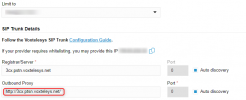
Please edit the post and remove the screenshots showing the trunk details; additionally, remove the outbound proxy you set as http://3cx.ptsn.voxteleys.net/. This is not valid.

You also need to check the authentication username and password as your trunk is not registered, and no calls will pass through it.

Additionally, check that you have an outbound rule configured to pass calls to the trunks once the above is corrected.
 
Please edit the post and remove the screenshots showing the trunk details; additionally, remove the outbound proxy you set as http://3cx.ptsn.voxteleys.net/. This is not valid.

You also need to check the authentication username and password as your trunk is not registered, and no calls will pass through it.

Additionally, check that you have an outbound rule configured to pass calls to the trunks once the above is corrected.
what do you mean when you say my trunk is not registered? I copied and pasted the username and password from the given area on vox. Im sorry Im genuinely confused with all of this.
 
also which outbound proxy is incorrect? and which outbound proxy do i need to create?
 
i have reentered the registered truck information into the 3cx
 
This part here is not correct

1715864481228.png

Re check your authitcation ID and password also as the trunk is still nto registed after you get this to regiter ensure you have an outbound rule to be able to route calls outbound.
 
That's what vox support told me to put there.

It should be registered. I paid for everything already for this month. It should be registered. My profile got cleared after the review. It should be registered. Shouldn't it
 
Our default template does not have this. This is why I flagged it; if Vox told you to do this, then OK. But you need to double-check the authorization ID and credentials.
 
My credentials are showing that they are registered and active.
 
Does the trunk show registered, Please? Green, not red?
 
The trunk is still showing up as red but my registered sip from Vox is active and I copied and pasted the login information over to 3cx so that should not be the issue
 
Status
Not open for further replies.

Forum statistics

Threads
111,832
Messages
589,280
Members
164,662
Latest member
DejanMDS