


- Joined
- Apr 2, 2025
- Messages
- 11
- Reaction score
- 7
Recently, one of my clients have been experiencing issues with their calls. One-way audio, dropped calls, no audio, etc. After working with both the SIP provider (SIP.US) and 3CX, it was decided that we would move them to a new SIP provider. I setup a second trunk using Twilio to test before we move everyone over. However, I've been unable to get the Twilio trunk to work. In 3CX, the trunk test says everything is fine, but I'm unable to make calls inbound calls to the trunk. Outbound works mostly but will fail every so often. In Twilio, I can see the call logs saying that there is a communication error.
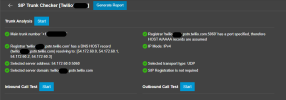
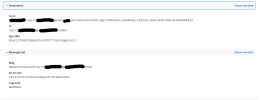
I followed everything on the setup instruction. Being Twilio, it was all automatic. I've tried everything I can to get this second trunk to work correctly. 3CX is currently running Version 20.0 Update 8 (Build 1121 Release) but was in-placed upgraded from v18. Another thing of note, this has been in-placed upgraded since they got the system, we are unsure what they started at as we inherited the system but believe it was v14. My next idea is to rebuild the server entirely and restore from a backup. Any additional insights or help would be greatly appreciated.
One final note, using our in-house test system, we were able to successfully setup a Twilio trunk as a second trunk and have experienced no issues with that, so I don't believe it was setup incorrectly.
I followed everything on the setup instruction. Being Twilio, it was all automatic. I've tried everything I can to get this second trunk to work correctly. 3CX is currently running Version 20.0 Update 8 (Build 1121 Release) but was in-placed upgraded from v18. Another thing of note, this has been in-placed upgraded since they got the system, we are unsure what they started at as we inherited the system but believe it was v14. My next idea is to rebuild the server entirely and restore from a backup. Any additional insights or help would be greatly appreciated.
One final note, using our in-house test system, we were able to successfully setup a Twilio trunk as a second trunk and have experienced no issues with that, so I don't believe it was setup incorrectly.


