Issues with Fanvil i10S Doorphone – DHCP Option 66 and Webserver Access

Montanstahl SA

Premier Customer
Joined
Apr 15, 2022
Messages
11
Reaction score
3
Hello everyone!

We are in the process of replacing our old doorphones with Fanvil i10S models, as recommended in the 3CX guide for Configuring Fanvil SIP Doorphones, Speakers and Paging Gateway

We’ve encountered a couple of issues:

1. DHCP Option 66 Not Being Accepted
The doorphone is ignoring the offered DHCP option 66.

Things we’ve tried so far:
  • Upgraded the firmware to the latest supported version (2.4.7), both via 3CX and manually.
  • Performed a factory reset, but no change.
  • Manually enabled DHCP option 66 on the doorphone (it’s disabled by default).
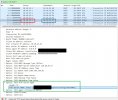
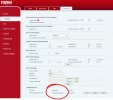
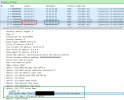
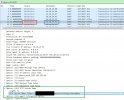
  • Sniffed traffic and confirmed that the DHCP server is correctly offering option 66 (10.10.29.1 is our DHCP server and 10.10.29.92 our doorphone).Sniff_DHCP_Option66.jpg
  • Tried RPS by providing internet access to the doorphone (no success).
  • Manually entered the provisioning URL (worked).
  • PnP provisioning (worked).
2. Webserver Refusing HTTP Connections
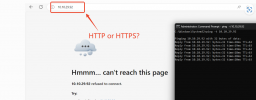
After a reboot, the doorphone works fine, but its webserver actively refuses HTTP connections, both from its own subnet and from others. A second reboot does not fix this issue; only a factory reset restores access, as mentioned in the Factory reset your Fanvil IP Phone | 3CX How-to Guide.
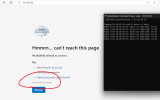
WebServer_refuses_the_connection.png

Has anyone experienced similar issues? We are running 3CX V20 Update 4 (Build 487, Debian Release).

Looking forward to hearing your thoughts!
 

Attachments

  • Sniff_DHCP_Option66.jpg
    Sniff_DHCP_Option66.jpg
    120.6 KB · Views: 0
  • Sniff_DHCP_Option66.jpg
    Sniff_DHCP_Option66.jpg
    120.6 KB · Views: 1
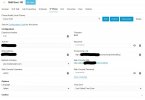
  • Fanvil_i10S_doorbell_3CX_config.jpg
    Fanvil_i10S_doorbell_3CX_config.jpg
    84.1 KB · Views: 3
Hello everyone!

We are in the process of replacing our old doorphones with Fanvil i10S models, as recommended in the 3CX guide for Configuring Fanvil SIP Doorphones, Speakers and Paging Gateway

We’ve encountered a couple of issues:

1. DHCP Option 66 Not Being Accepted
The doorphone is ignoring the offered DHCP option 66.

Things we’ve tried so far:
  • Upgraded the firmware to the latest supported version (2.4.7), both via 3CX and manually.
  • Performed a factory reset, but no change.
  • Manually enabled DHCP option 66 on the doorphone (it’s disabled by default).
  • Sniffed traffic and confirmed that the DHCP server is correctly offering option 66 (10.10.29.1 is our DHCP server and 10.10.29.92 our doorphone).View attachment 45679
  • Tried RPS by providing internet access to the doorphone (no success).
  • Manually entered the provisioning URL (worked).
  • PnP provisioning (worked).
2. Webserver Refusing HTTP Connections
After a reboot, the doorphone works fine, but its webserver actively refuses HTTP connections, both from its own subnet and from others. A second reboot does not fix this issue; only a factory reset restores access, as mentioned in the Factory reset your Fanvil IP Phone | 3CX How-to Guide.

View attachment 45676

Has anyone experienced similar issues? We are running 3CX V20 Update 4 (Build 487, Debian Release).

Looking forward to hearing your thoughts!
For the purposes of this guide: https://www.3cx.com/sip-phones/fanvil-sip-doorphones/ the only valid provisioning method is PnP provisioning
 
I understand, but the issue still remains with not being able to access the doorbell after a power cycle or power loss. Any updates on this?
 
Regarding the guide: Configuring Fanvil SIP Doorphones, Speakers and Paging Gateway
3CX is on premise
  1. Select where your phone will be located.
  1. Outside the office (Remote)
  2. In the office (Local)
  1. Choose your Fanvil intercom from the drop-down menu.
  2. Enter the phone’s MAC address without dashes or colons, and click “Add phone”.
  3. If you selected “Outside the office” specify the router phone or SBC.
  4. Connect the phone to the network within 14 days. If it is already connected, restart it.
  5. The phone will be configured automatically.
It seems to me that this refers to RPS rather than PnP, which isn’t working either.

Am I missing something here?
 
Respecto a la guía: Configuración de porteros automáticos SIP, altavoces y puerta de enlace de buscapersonas Fanvil

Me parece que esto se refiere a RPS y no a PnP , lo que tampoco funciona.

¿Me estoy perdiendo algo aquí?
When provisioning a Fanvil phone using 3CX with a FQDN provided by 3CX, you may see a "not secure" message in the phone's web interface because the default certificate issued by 3CX is only trusted for HTTPS connections to the FQDN.

Please use a browser that allows access to non-secure sites, or enable that in your browser: https://support.mozilla.org/en-US/questions/1314832

You can open a support case directly with fanvil:
https://www.fanvil.com/service/help/index.html
 
2. Webserver Refusing HTTP Connections
After a reboot, the doorphone works fine, but its webserver actively refuses HTTP connections, both from its own subnet and from others. A second reboot does not fix this issue; only a factory reset restores access, as mentioned in the Factory reset your Fanvil IP Phone | 3CX How-to Guide.
Hi Just to confirm one thing,when you try to accesse 10.10.29.92, is it http://10.10.29.92/ or https://10.10.29.92/
If it's the former, have you tried the latter?
Because typically, after 3CX successfully deploys to a device, its protocol changes from HTTP to HTTPS. When you reset the device, the protocol changes back from HTTPS to HTTP.
1734487573636.png
 
  • Like
Reactions: Anion
Okay, so it's clear that provisioning disables HTTP and enables HTTPS.
When provisioning a Fanvil phone using 3CX with a FQDN provided by 3CX, you may see a "not secure" message in the phone's web interface because the default certificate issued by 3CX is only trusted for HTTPS connections to the FQDN.
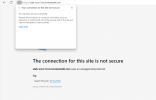
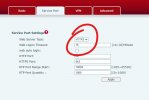
The problem is, there's no certificate at all, as shown here. I couldn’t find a way to bypass this in either Firefox or Edge.
https_custom4.png

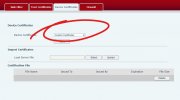
I also tried uploading a custom certificate issued by our private CA before provisioning, but it still didn’t work. The web server isn’t offering any SSL certificate.

https_custom1.jpg

https_custom2.jpg

https_custom3.jpg
 
We updated to firmware version V2.12.48.14 instead of the 3CX-recommended V2.4.7. With this version, autoprovisioning is functioning, and modern browsers can now connect to the doorphone's web interface without issues. However, we're a bit disappointed that relying on the officially supported 3CX firmware led to so many problems, ultimately forcing us to use an 'unsupported' firmware version to resolve them.
 
I have also encountered this same issue with the Fanvil i16sv, as soon as I reboot after provisioning it is no longer accessible on HTTP/80 and HTTPS/443 doesn't work due to a certificate error.
 
Apparently, firmware version V2.4.7 uses an unsupported cipher suite during the TLS handshake, not an invalid certificate. This issue persists even if you upload a custom certificate instead of relying on the built-in self-signed one. As a result, modern browsers like Edge, Chrome, and Firefox block the connection entirely, without an option to bypass the security warning. If you choose to stick with V2.4.7, you can use legacy Internet Explorer to access the door phone after the provisioning process switches to HTTPS. Oddly, the 3CX admin console displays the phone address in HTTP instead of HTTPS, which is misleading given that the 3CX default phone template automatically switches to HTTPS.
 
  • Like
Reactions: Anion and JohnS_3CX
Hi,

We can also confirm this issue, in this case Fanvil will have to provide us with newer firmware to bring the devices up to date.

Once they fully test and provide the new firmware and templates for the latest 3CX release, it can be scheduled to come out with our next service pack.
 
Hi,

We can also confirm this issue, in this case Fanvil will have to provide us with newer firmware to bring the devices up to date.

Once they fully test and provide the new firmware and templates for the latest 3CX release, it can be scheduled to come out with our next service pack.

Hi JohnS,

Do you have any updated ETA of whe these templates may be available / released?
 
Hi @edegan

Not yet, they have been informed and have scheduled it as part of the yearly updates we get on supported devices.
 
Hi @edegan

Not yet, they have been informed and have scheduled it as part of the yearly updates we get on supported devices.

Hi John,

Do you have a link to the previous supported firmware, not 2.4.7?
 
Hi John,

Do you have a link to the previous supported firmware, not 2.4.7?

As far as I remember there never was anything previous to that one supported by 3CX.

You have to check Fanvil's website if you want other versions.
 
Hi @edegan

Not yet, they have been informed and have scheduled it as part of the yearly updates we get on supported devices.
Any updates on when this issue will be addressed? We're now on Version 20.0 Update 5 (Build 551 Release), but nothing has changed. The latest available firmware is still 2.4.7. I’d also like to add that the Fanvil i16SV has the same issue, and on top of that, when making calls using its function key, no video is visible in the 3CX (PWA).
 
Any updates on when this issue will be addressed? We're now on Version 20.0 Update 5 (Build 551 Release), but nothing has changed. The latest available firmware is still 2.4.7. I’d also like to add that the Fanvil i16SV has the same issue, and on top of that, when making calls using its function key, no video is visible in the 3CX (PWA).
The issues have already been raised and they are working on it. Some models have already received updates, but not the i16SV, they are still working on the video issue.
 

Members Online Now

Forum statistics

Threads
111,834
Messages
589,287
Members
164,663
Latest member
svdDGS