Solved Issues with Ring Time

Status
Not open for further replies.

GEEVEE

Customer
Joined
Mar 25, 2019
Messages
26
Reaction score
3
I have 3CX Professional Edition V18 Build 314 running on the cloud (not 3CX Hosted). We have 6 incoming channels and 5 user extensions. The phone system works fine. However, I am trying to troubleshoot an issue with ring time. During business hours, the calls are directed to a ring group with a ring all strategy. The Ring time is set to 50 seconds. On each of the extensions in the ring group, the time out for internal calls is set to 50 seconds are each of the extensions are set to accept multiple calls. The issue is that all call goes to voice mail after the second ring before the call can be picked up at any of the extension. Is there an additional parameter that is hidden that overrides the 50 second time out configuration that is set in the ring group and at the extension level. Is there a verbose log that I can generate to see the step by step flow of a call coming in to see which parameter is in force for a call from beginning to end. Customers are getting annoyed and it is becoming a customer service issue. Any assistance will be greatly appreciated.

GEEVEE
 
Each ring group has a "Ring Time (Seconds)" field. The default is 20s.
 
The ring group ring time is set to 50 seconds now. I think that this may have to do something with my SIP provider configuration. I am going to look at the parameters that are setup on their portal.

GEEVEE
 
Could be a sip provider issue - terminating the call after x seconds. To confirm this , check the activity log

Do you have any extension, set to forward to mobile number
 
Last edited:
No extensions are set to forward to mobile number. All mobiles have 3CX client installed. So they will ring when the calls come in (in addition to the desktop phones)

GEEVEE
 
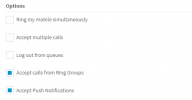
Check the extension forwarding rules - to see if 'Accept calls from Ring Groups' is ticked

1643273668059.png


Check the current status of the phone - Management console - Users, Select the extension and click 'Status' along the top
 
Hi!

We have heard lately that some providers for some reason, even though someone is making one call to your Number, the provider is sending it 2 times.
In this case what could be happening is that the 1st call causes the 2 rings you hear, but once the 2nd call arrives, it finds the Ring Group members all busy (Ring All makes everyone busy and "Accept Multiple Calls" doe not work for RGs) and goes to VMail.

Try this too, change the polling strategy to Prioritized Hunt and make sure you have at least 2 extensions registered and no other calls active, then, make a call from your mobile into the system.
Will only 1 extension ring, or will 2 ring?
 
Resolved

SIP provider (Call Centric) had a timeout setting that was shorter than the timeout settings in 3CX. Once that was made greater than the setting in 3CX, things are now working as expected.
 
  • Like
Reactions: NickD_3CX
Glad you figured it out!

I will set this thread as 'Solved'.
 
Status
Not open for further replies.

Forum statistics

Threads
111,974
Messages
590,081
Members
164,899
Latest member
mazet