- Joined
- Feb 18, 2022
- Messages
- 2
- Reaction score
- 0
Good morning,
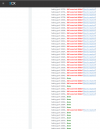
as per object, the firewall test fails, but after port 10696, and then resumed occasionally after 10833 and consistently after 10870 as per attached screenshot.
The firewall is a Juniper SRX 3600: we opened a ticket to the parent company that supported us in the configuration (previously all ports failed) of which I report an anonymized extract.
The juniper support we sniffed agrees that packets pass through regularly.
What could this fault on those particular ports depend on, could it be a "false positive"?
Junos script configurations:
- filtro applicato su interfaccia dove attestato il server
set firewall filter Internet-Pomezia-Net2_0 term to_Internet from source-address xx.xx.xx.xx/32
set firewall filter Internet-Pomezia-Net2_0 term to_Internet then routing-instance Internet
- source persistent-nat
set security nat source rule-set DMZ_to_INTERNET from zone DMZ
set security nat source rule-set DMZ_to_INTERNET to zone INTERNET
set security nat source rule-set DMZ_to_INTERNET rule 3CX_to_INTERNET description RF003895
set security nat source rule-set DMZ_to_INTERNET rule 3CX_to_INTERNET match source-address xx.xx.xx.xx/32
set security nat source rule-set DMZ_to_INTERNET rule 3CX_to_INTERNET then source-nat pool 3CX
set security nat source rule-set DMZ_to_INTERNET rule 3CX_to_INTERNET then source-nat pool persistent-nat permit any-remote-host
set security nat source rule-set DMZ_to_INTERNET rule 3CX_to_INTERNET then source-nat pool persistent-nat address-mapping
deactivate security nat source rule-set DMZ_to_INTERNET rule 3CX_to_INTERNET then source-nat pool persistent-nat address-mapping
set security nat source rule-set DMZ_to_INTERNET rule 3CX_to_INTERNET then source-nat pool persistent-nat inactivity-timeout 1800
set security nat source rule-set DMZ_to_INTERNET rule 3CX_to_INTERNET then source-nat pool persistent-nat max-session-number 65000 --> WAS #800 --> ALL GREEN ON 1600
set security nat source pool 3CX address yy.yy.yy.205/32
set security nat source pool 3CX address yy.yy.yy.206/32
set security nat source pool 3CX port no-translation
- destination nat
set security nat destination rule-set from_Internet rule INTERNET_to_SRVXXXX-3CX description RF003895
set security nat destination rule-set from_Internet rule INTERNET_to_SRVXXXX-3CX match destination-address yy.yy.yy.206/32
set security nat destination rule-set from_Internet rule INTERNET_to_SRVXXXX-3CX then destination-nat pool SRVXXXX-3CX
- Policy DMZ to INTERNET
set security policies from-zone DMZ to-zone INTERNET policy SRVXXXX-3CX_to_INTERNET description RF003895
set security policies from-zone DMZ to-zone INTERNET policy SRVXXXX-3CX_to_INTERNET match source-address SRVXXXX-3CX
set security policies from-zone DMZ to-zone INTERNET policy SRVXXXX-3CX_to_INTERNET match destination-address any
set security policies from-zone DMZ to-zone INTERNET policy SRVXXXX-3CX_to_INTERNET match application TCP-443
set security policies from-zone DMZ to-zone INTERNET policy SRVXXXX-3CX_to_INTERNET match application TCP-2197
set security policies from-zone DMZ to-zone INTERNET policy SRVXXXX-3CX_to_INTERNET match application TCP-5223
set security policies from-zone DMZ to-zone INTERNET policy SRVXXXX-3CX_to_INTERNET match application UDP-5060
set security policies from-zone DMZ to-zone INTERNET policy SRVXXXX-3CX_to_INTERNET match application UDP-5090
set security policies from-zone DMZ to-zone INTERNET policy SRVXXXX-3CX_to_INTERNET match application UDP-9000-10999
set security policies from-zone DMZ to-zone INTERNET policy SRVXXXX-3CX_to_INTERNET match application UDP-3478
set security policies from-zone DMZ to-zone INTERNET policy SRVXXXX-3CX_to_INTERNET match application TCP-3478
set security policies from-zone DMZ to-zone INTERNET policy SRVXXXX-3CX_to_INTERNET match application UDP-3479
set security policies from-zone DMZ to-zone INTERNET policy SRVXXXX-3CX_to_INTERNET match application TCP-3479
set security policies from-zone DMZ to-zone INTERNET policy SRVXXXX-3CX_to_INTERNET then permit
- Policy Internet to DMZ
set security policies from-zone INTERNET to-zone DMZ policy INTERNET_to_SRVXXXX-3CX description RF003895
set security policies from-zone INTERNET to-zone DMZ policy INTERNET_to_SRVXXXX-3CX match source-address any
set security policies from-zone INTERNET to-zone DMZ policy INTERNET_to_SRVXXXX-3CX match destination-address SRVXXXX-3CX
set security policies from-zone INTERNET to-zone DMZ policy INTERNET_to_SRVXXXX-3CX match application 3CX
set security policies from-zone INTERNET to-zone DMZ policy INTERNET_to_SRVXXXX-3CX match application TCP-5001
set security policies from-zone INTERNET to-zone DMZ policy INTERNET_to_SRVXXXX-3CX then permit
An example of tcpdump capture on Debian server 3CX:
Debian GNU/Linux comes with ABSOLUTELY NO WARRANTY, to the extent
permitted by applicable law.
Last login: Tue May 24 10:18:24 2022 from xx.xx.xx.xx
root@unassigned-hostname:~# tcpdump -n -i ens192 port 10746
tcpdump: verbose output suppressed, use -v or -vv for full protocol decode
listening on ens192, link-type EN10MB (Ethernet), capture size 262144 bytes
12:28:50.029916 IP xx.xx.xx.xx.10746 > 192.248.177.74.3478: UDP, length 28
12:28:50.059957 IP 192.248.177.74.3478 > xx.xx.xx.xx.10746: UDP, length 96
12:29:09.649028 IP xx.xx.xx.xx.10746 > 192.248.177.74.3478: UDP, length 28
12:29:10.656409 IP xx.xx.xx.xx.10746 > 192.248.177.74.3478: UDP, length 28
12:29:11.666448 IP xx.xx.xx.xx.10746 > 192.248.177.74.3478: UDP, length 28
^C
5 packets captured
5 packets received by filter
0 packets dropped by kernel
root@unassigned-hostname:~# tcpdump -n -i ens192 port 10634
tcpdump: verbose output suppressed, use -v or -vv for full protocol decode
listening on ens192, link-type EN10MB (Ethernet), capture size 262144 bytes
12:30:22.049981 IP xx.xx.xx.xx.10634 > 147.135.193.83.3478: UDP, length 28
12:30:22.080095 IP 147.135.193.83.3478 > xx.xx.xx.xx.10634: UDP, length 96
12:30:27.094334 IP xx.xx.xx.xx.10634 > 147.135.193.83.3478: UDP, length 28
12:30:27.124344 IP 151.80.120.125.3479 > xx.xx.xx.xx.10634: UDP, length 96
12:29:09.649028 IP xx.xx.xx.xx.10746 > 192.248.177.74.3478: UDP, length 28
12:29:10.656409 IP xx.xx.xx.xx.10746 > 192.248.177.74.3478: UDP, length 28
12:29:11.666448 IP xx.xx.xx.xx.10746 > 192.248.177.74.3478: UDP, length 28
12:36:05.242579 IP xx.xx.xx.xx.10634 > 54.38.41.146.3478: UDP, length 28
12:36:05.269978 IP 54.38.41.146.3478 > xx.xx.xx.xx.10634: UDP, length 96
12:36:10.323804 IP xx.xx.xx.xx.10634 > 54.38.41.146.3478: UDP, length 28
12:36:10.352900 IP 51.91.201.86.3479 > xx.xx.xx.xx.10634: UDP, length 96
Port 10746 for example fails, but a response appears from the STUN server, while port 10634 receives 2 responses from the STUN server and does not fail the test.
By analyzing the log traces, Juniper ensures that packets go through the firewall.
I also made some tests with max connection at 1600 obtaining a nice general "green", but only once.
Any Ideas?
Many thanks in advance
L.B.
as per object, the firewall test fails, but after port 10696, and then resumed occasionally after 10833 and consistently after 10870 as per attached screenshot.
The firewall is a Juniper SRX 3600: we opened a ticket to the parent company that supported us in the configuration (previously all ports failed) of which I report an anonymized extract.
The juniper support we sniffed agrees that packets pass through regularly.
What could this fault on those particular ports depend on, could it be a "false positive"?
Junos script configurations:
- filtro applicato su interfaccia dove attestato il server
set firewall filter Internet-Pomezia-Net2_0 term to_Internet from source-address xx.xx.xx.xx/32
set firewall filter Internet-Pomezia-Net2_0 term to_Internet then routing-instance Internet
- source persistent-nat
set security nat source rule-set DMZ_to_INTERNET from zone DMZ
set security nat source rule-set DMZ_to_INTERNET to zone INTERNET
set security nat source rule-set DMZ_to_INTERNET rule 3CX_to_INTERNET description RF003895
set security nat source rule-set DMZ_to_INTERNET rule 3CX_to_INTERNET match source-address xx.xx.xx.xx/32
set security nat source rule-set DMZ_to_INTERNET rule 3CX_to_INTERNET then source-nat pool 3CX
set security nat source rule-set DMZ_to_INTERNET rule 3CX_to_INTERNET then source-nat pool persistent-nat permit any-remote-host
set security nat source rule-set DMZ_to_INTERNET rule 3CX_to_INTERNET then source-nat pool persistent-nat address-mapping
deactivate security nat source rule-set DMZ_to_INTERNET rule 3CX_to_INTERNET then source-nat pool persistent-nat address-mapping
set security nat source rule-set DMZ_to_INTERNET rule 3CX_to_INTERNET then source-nat pool persistent-nat inactivity-timeout 1800
set security nat source rule-set DMZ_to_INTERNET rule 3CX_to_INTERNET then source-nat pool persistent-nat max-session-number 65000 --> WAS #800 --> ALL GREEN ON 1600
set security nat source pool 3CX address yy.yy.yy.205/32
set security nat source pool 3CX address yy.yy.yy.206/32
set security nat source pool 3CX port no-translation
- destination nat
set security nat destination rule-set from_Internet rule INTERNET_to_SRVXXXX-3CX description RF003895
set security nat destination rule-set from_Internet rule INTERNET_to_SRVXXXX-3CX match destination-address yy.yy.yy.206/32
set security nat destination rule-set from_Internet rule INTERNET_to_SRVXXXX-3CX then destination-nat pool SRVXXXX-3CX
- Policy DMZ to INTERNET
set security policies from-zone DMZ to-zone INTERNET policy SRVXXXX-3CX_to_INTERNET description RF003895
set security policies from-zone DMZ to-zone INTERNET policy SRVXXXX-3CX_to_INTERNET match source-address SRVXXXX-3CX
set security policies from-zone DMZ to-zone INTERNET policy SRVXXXX-3CX_to_INTERNET match destination-address any
set security policies from-zone DMZ to-zone INTERNET policy SRVXXXX-3CX_to_INTERNET match application TCP-443
set security policies from-zone DMZ to-zone INTERNET policy SRVXXXX-3CX_to_INTERNET match application TCP-2197
set security policies from-zone DMZ to-zone INTERNET policy SRVXXXX-3CX_to_INTERNET match application TCP-5223
set security policies from-zone DMZ to-zone INTERNET policy SRVXXXX-3CX_to_INTERNET match application UDP-5060
set security policies from-zone DMZ to-zone INTERNET policy SRVXXXX-3CX_to_INTERNET match application UDP-5090
set security policies from-zone DMZ to-zone INTERNET policy SRVXXXX-3CX_to_INTERNET match application UDP-9000-10999
set security policies from-zone DMZ to-zone INTERNET policy SRVXXXX-3CX_to_INTERNET match application UDP-3478
set security policies from-zone DMZ to-zone INTERNET policy SRVXXXX-3CX_to_INTERNET match application TCP-3478
set security policies from-zone DMZ to-zone INTERNET policy SRVXXXX-3CX_to_INTERNET match application UDP-3479
set security policies from-zone DMZ to-zone INTERNET policy SRVXXXX-3CX_to_INTERNET match application TCP-3479
set security policies from-zone DMZ to-zone INTERNET policy SRVXXXX-3CX_to_INTERNET then permit
- Policy Internet to DMZ
set security policies from-zone INTERNET to-zone DMZ policy INTERNET_to_SRVXXXX-3CX description RF003895
set security policies from-zone INTERNET to-zone DMZ policy INTERNET_to_SRVXXXX-3CX match source-address any
set security policies from-zone INTERNET to-zone DMZ policy INTERNET_to_SRVXXXX-3CX match destination-address SRVXXXX-3CX
set security policies from-zone INTERNET to-zone DMZ policy INTERNET_to_SRVXXXX-3CX match application 3CX
set security policies from-zone INTERNET to-zone DMZ policy INTERNET_to_SRVXXXX-3CX match application TCP-5001
set security policies from-zone INTERNET to-zone DMZ policy INTERNET_to_SRVXXXX-3CX then permit
An example of tcpdump capture on Debian server 3CX:
Debian GNU/Linux comes with ABSOLUTELY NO WARRANTY, to the extent
permitted by applicable law.
Last login: Tue May 24 10:18:24 2022 from xx.xx.xx.xx
root@unassigned-hostname:~# tcpdump -n -i ens192 port 10746
tcpdump: verbose output suppressed, use -v or -vv for full protocol decode
listening on ens192, link-type EN10MB (Ethernet), capture size 262144 bytes
12:28:50.029916 IP xx.xx.xx.xx.10746 > 192.248.177.74.3478: UDP, length 28
12:28:50.059957 IP 192.248.177.74.3478 > xx.xx.xx.xx.10746: UDP, length 96
12:29:09.649028 IP xx.xx.xx.xx.10746 > 192.248.177.74.3478: UDP, length 28
12:29:10.656409 IP xx.xx.xx.xx.10746 > 192.248.177.74.3478: UDP, length 28
12:29:11.666448 IP xx.xx.xx.xx.10746 > 192.248.177.74.3478: UDP, length 28
^C
5 packets captured
5 packets received by filter
0 packets dropped by kernel
root@unassigned-hostname:~# tcpdump -n -i ens192 port 10634
tcpdump: verbose output suppressed, use -v or -vv for full protocol decode
listening on ens192, link-type EN10MB (Ethernet), capture size 262144 bytes
12:30:22.049981 IP xx.xx.xx.xx.10634 > 147.135.193.83.3478: UDP, length 28
12:30:22.080095 IP 147.135.193.83.3478 > xx.xx.xx.xx.10634: UDP, length 96
12:30:27.094334 IP xx.xx.xx.xx.10634 > 147.135.193.83.3478: UDP, length 28
12:30:27.124344 IP 151.80.120.125.3479 > xx.xx.xx.xx.10634: UDP, length 96
12:29:09.649028 IP xx.xx.xx.xx.10746 > 192.248.177.74.3478: UDP, length 28
12:29:10.656409 IP xx.xx.xx.xx.10746 > 192.248.177.74.3478: UDP, length 28
12:29:11.666448 IP xx.xx.xx.xx.10746 > 192.248.177.74.3478: UDP, length 28
12:36:05.242579 IP xx.xx.xx.xx.10634 > 54.38.41.146.3478: UDP, length 28
12:36:05.269978 IP 54.38.41.146.3478 > xx.xx.xx.xx.10634: UDP, length 96
12:36:10.323804 IP xx.xx.xx.xx.10634 > 54.38.41.146.3478: UDP, length 28
12:36:10.352900 IP 51.91.201.86.3479 > xx.xx.xx.xx.10634: UDP, length 96
Port 10746 for example fails, but a response appears from the STUN server, while port 10634 receives 2 responses from the STUN server and does not fail the test.
By analyzing the log traces, Juniper ensures that packets go through the firewall.
I also made some tests with max connection at 1600 obtaining a nice general "green", but only once.
Any Ideas?
Many thanks in advance
L.B.