Keyboard shortcut to bring 3cx on top

Status
Not open for further replies.

Parslej

Forum User
Joined
Jun 16, 2021
Messages
62
Reaction score
18
Is there any way / workaround to configure key shortcut to bring app to front / back in Windows ?
Usually I have multiple windows openned, have switchobard docked somewhere in the corner but I cant see main app with dialpad
Id like to use some global shortcut to bring app on top (ideally with dialpad shown...)


Im using 3cx Phone for WIndows v.16
 
Hi @Parslej,

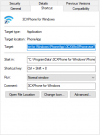
I'd think to do this with Windows hotkeys. Simply right click the 3CX Phone for Windows icon and select Properties. Under the Shortcut tab, add a shortcut key (I did Ctrl + Shift + 8 to test). When pressing the shortcut key, it brings the switchboard to the front as well.

1629365249037.png
 
This doesnt work when app is running and hidden (visible as tray icon only)
Works only if starting app 1st time
 
Hi @Paslej,

Without 3rd party software it won't be possible. The 3CX Windows Client Hotkeys are defined in the Settings >> Hotkeys section and do not include a "bring to front" option. I normally leave my switchboard open but minimized and use Alt + Tab, however you'd need it open to work with this method of switching.
 
What a pitty !
Do know any 3rd part sw which might allow that ?

PS. I would vote to add this option (if I would have enough points create new thread there :) )
 
Hi @Parslej,

If you'd like to have this feature request escalated to the Ideas forum, I'd suggest contacting a 3CX Partner to assist in escalation.

I can't make any suggestions with regards to 3rd party applications, however I know if you google you'll find a bunch that you can try out.
 
Status
Not open for further replies.

Forum statistics

Threads
112,349
Messages
592,027
Members
165,513
Latest member
megalmazan