Launch External Application Powershell Pass Variables

Status
Not open for further replies.

SystemWise

Silver Partner
Advanced Certified
Joined
Dec 12, 2014
Messages
39
Reaction score
13
Hello,

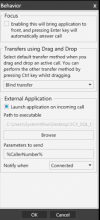
We are trying to use the "External Application" function in the V16 client to launch a batch file and pass the %CallerNumber% parameter on, then the batch file launches a ps1 script using the parameter value as a variable. My question is in our batch file how do we reference the parameter value correctly?

For example our batch file presently says this:

C:\Windows\System32\WindowsPowerShell\v1.0\powershell.exe -command "C:\Users\Bob\Desktop\3CX_SQL_Query.ps1 -number %CallerNumber%"

But the %CallerNumber% is not being passed on. Can anyone tell me how I reference the parameter within the batch file?
MicrosoftTeams-image (4).png
 
  • Like
Reactions: ChrisC_3CX
Hi,
We're having the same issue.

NickD_3CX your reference is not very helpful because that's what we're doing, but seems like the 3CX Windows App doesn't forward the variable to the exe\bat\ps file.​

That was done great by the old v16 client and we're using this a lot for our clients.
We really need a solution to pass the variables to some script\batch files.
 
Hi,
We're having the same issue.

NickD_3CX your reference is not very helpful because that's what we're doing, but seems like the 3CX Windows App doesn't forward the variable to the exe\bat\ps file.​

That was done great by the old v16 client and we're using this a lot for our clients.
We really need a solution to pass the variables to some script\batch files.
In my tests, it forwards it just fine:
launch_external_app.gif

Is this what you are trying to do?

I'm not sure though I understand what you mean when you said "That was done great by the old v16 client...".
What are you using? If you are using the new Electron-based Desktop App, this is not possible with that right now.

To note, the OP is clearly referring to the 'old' Windows Client and not the new Desktop App.
 
  • Like
Reactions: VasilisV_3CX
In my tests, it forwards it just fine:
View attachment 26028

Is this what you are trying to do?

I'm not sure though I understand what you mean when you said "That was done great by the old v16 client...".
What are you using? If you are using the new Electron-based Desktop App, this is not possible with that right now.

To note, the OP is clearly referring to the 'old' Windows Client and not the new Desktop App.
Yes, I'm using the new desktop app. sorry, didn't noticed that the OP was talking about the v16.
 
Hi Nick,

We got the variable passing to the script and all looked good. Unfortunately we hit a new problem. The script is doing a SQL lookup and works when manually run, but when it is launched by the 3CX app it seems to think it does not have access to the SQL commandlets. From Task Manager it looks like it runs as the user, but the user does have access to the commandlets. Any ideas?

Regards,
 
Hi Nick,

We got the variable passing to the script and all looked good. Unfortunately we hit a new problem. The script is doing a SQL lookup and works when manually run, but when it is launched by the 3CX app it seems to think it does not have access to the SQL commandlets. From Task Manager it looks like it runs as the user, but the user does have access to the commandlets. Any ideas?

Regards,
I would imagine that if the script is being invoked by the 3CX Client, the script is ran as the same user that the Client was run as.
Maybe try running the 3CX Client as the user you need to run the script as?
 
Hi Nick,

The logged in user could run the script. When the 3CX Client launched the script it ran it as the logged on user, according to task manager, and when I checked the 3CX Client it runs as the logged in user.

Regards,

Tony
 
Hi Nick,

The logged in user could run the script. When the 3CX Client launched the script it ran it as the logged on user, according to task manager, and when I checked the 3CX Client it runs as the logged in user.

Regards,

Tony
So then you need to debug your script. The Desktop App runs the script, other than that it does not have any way of "altering" what the script does. The most common mistakes that I have seen people make when having the app launch a script are:
  • When using paths, use the absolute path and not the relative paths
  • The variables that are passed onto the script as parameters have spaces, so the actual script interprets it as 2 different variables.
 
  • Like
Reactions: Evolute IT
Status
Not open for further replies.

Forum statistics

Threads
112,349
Messages
592,027
Members
165,514
Latest member
megalmazan