Solved License transfer issue

Status
Not open for further replies.

crenegar

Silver Partner
Basic Certified
Joined
Jan 8, 2020
Messages
16
Reaction score
0
Moving existing on premise customer to hosted by 3CX. Customer was previously associated with another partner. their license is an 8SC and is paid through April, 2023. Doesn't seem to be any obvious way to transfer the license to the new host. We created a new account as there were a lot of artifacts, unused rules, extensions etc...that were not used so we are NOT restoring a backup, just want to transfer the license. The previous partner is dragging their feet cooperating. Any assistance would be great.
 
Hello,

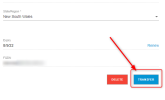
Please note that you can Transfer the Key ownership through your 3CX portal (https://portal.3cx.com/)
Click the Key and then Select Transfer.
1660013412210.png

Also regarding moving from on an existing on Premises installation to Hosted with 3CX:

First of all please note that there are some restrictions/rules with the Hosted instances

Whether you want to install the current license as Hosted or copy your configuration and setup a new License Key, first of all you need to create a backup of your current PBX without License Key and FQDN and save it.

Also note that if you have a custom FQDN you need to release it before install the PBX as Hosted with 3CX as custom FQDNs are not allowed.
 
Last edited by a moderator:
@crenegar one question to clear things up, does your customer own the license key or not ?
What i mean is, does your customer have access to portal and is license key bound with their email or the key is owned by the partner and your customer is renting it ?
 
Status
Not open for further replies.

Forum statistics

Threads
111,974
Messages
590,081
Members
164,899
Latest member
mazet