Linux Failover Script Questions - Before vs After ?

Status
Not open for further replies.

Migrate_to_ThreeSeeAches

Free User
Joined
Feb 9, 2024
Messages
11
Reaction score
3
Hello Internets,

I'm trying to build a Active / Passive test environment as a proof of concept for the resiliciency of 3CX and convince the naysayers.

The docs which I'm using are:

1. Configuring Failover with 3CX https://www.3cx.com/docs/failover/
No mention of details of pre vs post scripts as shown in the screenshot from this doc.
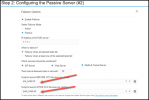
1707522796746.png

2. Linux Failover Scripts https://www.3cx.com/docs/linux-pbx-failover/
No mention of details of before or after scripts.
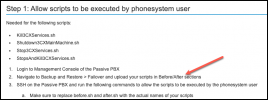
1707522949857.png

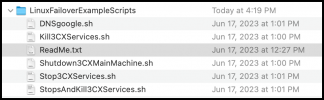
3. ReadMe.txt
No mention of which files should be used before or after
1707523033259.png

What am I missing here ?

TIA,

Migrationationista
 
Hi,

My original post shows the 3CX docs that I've already reviewed before posting this question:

+++++++++++++++++
The docs which I'm using are:
1. Configuring Failover with 3CX https://www.3cx.com/docs/failover/
2. Linux Failover Scripts https://www.3cx.com/docs/linux-pbx-failover/
+++++++++++++++++

Neither of those docs provide any insight into what the before / after scripts should accomplish. The docs and screenshots reference "pre_script.sh" and "post_script.sh" and those are not in the zip file containing the various Linux scripts.
 
There are no mandatory scripts you need to run for failover, but you may wish to. In which case, examples are just examples, and you should customize or make your own.

Example:
You may wish to use 3CX failover scripts to handle the need to update DNS. If you are running split DNS and the PBX changes from IP .10 to IP .20, you need to change that somehow in the DNS server for the phones, apps, etc to know where 3CX is now. Hence a script that can do so, which 3CX can execute as part of failover..
 
  • Like
Reactions: Evolute IT
Thanks!

I'm stilling trying to get the correct sequence and which scripts to use in the MC >> Failover Script Options BEFORE and AFTER fields:

So would this make sense if I were to use the provided scripts ?
1. Passive server monitors Active server and detects issue
2. Passive server kicks off script found in "Failover Script Operations" Choose a script to launch BEFORE 3CX Services are started: and kicks off DNSgoogle.sh
3. Passive server kicks off script found in "Failover Script Operations" Choose a script to launch AFTER 3CX Services are started: and kicks off StopsAndKill3CXServices.sh

At this point - the Passive PBX is now in production.
 
I'm stilling trying to get the correct sequence and which scripts to use in the MC >> Failover Script Options BEFORE and AFTER fields:
That's because there is no right answer - it's all very dependent on your environment/setup. I can't tell you without looking at your specific setup.

1. Passive server monitors Active server and detects issue
Correct

2. Passive server kicks off script found in "Failover Script Operations" Choose a script to launch BEFORE 3CX Services are started: and kicks off DNSgoogle.sh
Is your DNS hosted with Google? That script updates a record in Google Cloud - which would make sense if the public IP were changing AND you hosted your PUBLIC DNS with Google. It does not handle internal DNS, unless you also host that with Google, which would be highly unusual. You're posting in the On-Prem section which likely means your PBX is in your network - I would think that the public IP is staying the same and ONLY the internal IP is changing.

I also would run this AFTER failover happens personally.
3. Passive server kicks off script found in "Failover Script Operations" Choose a script to launch AFTER 3CX Services are started: and kicks off StopsAndKill3CXServices.sh
This script stops and kills 3CX services. If I were to run this script, I would run it before the failover, to make sure that 3CX was truly dead on the master PBX and wouldn't interfere before I brought it up on the slave. But I might also run a different script - I run 3CX as a VM - and that script would stop the 3CX VM altogether.
 
For this test, I stood up the Active and the Passive in Azure and used the 3CX provided FQDNs.

So help me to understand as I don't get involved with DNS issues : ) I assume I cannot run that DNSgoogle.sh script to trigger the IP address change....correct?

With the ENT license, the TTL on the DNS is 5 minutes - and I've checked and confirmed that if I power down the Active - the global DNS ( at least when querying 8.8.8.8 / Google ) changes to the Passive IP darn close to 5 minutes.

So - in theory - if I use 3CX provided FQDNs and am willing to wait the 5 minutes AND my phone endpoints map to the public domain name - I wouldn't need to run any script to initiate the DNS change.

I'm now starting to think all I need to do is allow the TTL to expire and then perhaps run the Shutdown3CXMainMachine.sh BEFORE starting services on the Passive PBX.


That's because there is no right answer - it's all very dependent on your environment/setup. I can't tell you without looking at your specific setup.

Correct


Is your DNS hosted with Google? That script updates a record in Google Cloud - which would make sense if the public IP were changing AND you hosted your PUBLIC DNS with Google. It does not handle internal DNS, unless you also host that with Google, which would be highly unusual. You're posting in the On-Prem section which likely means your PBX is in your network - I would think that the public IP is staying the same and ONLY the internal IP is changing.

I also would run this AFTER failover happens personally.

This script stops and kills 3CX services. If I were to run this script, I would run it before the failover, to make sure that 3CX was truly dead on the master PBX and wouldn't interfere before I brought it up on the slave. But I might also run a different script - I run 3CX as a VM - and that script would stop the 3CX VM altogether.
 
For this test, I stood up the Active and the Passive in Azure and used the 3CX provided FQDNs.

So help me to understand as I don't get involved with DNS issues : ) I assume I cannot run that DNSgoogle.sh script to trigger the IP address change....correct?

With the ENT license, the TTL on the DNS is 5 minutes - and I've checked and confirmed that if I power down the Active - the global DNS ( at least when querying 8.8.8.8 / Google ) changes to the Passive IP darn close to 5 minutes.

So - in theory - if I use 3CX provided FQDNs and am willing to wait the 5 minutes AND my phone endpoints map to the public domain name - I wouldn't need to run any script to initiate the DNS change.

I'm now starting to think all I need to do is allow the TTL to expire and then perhaps run the Shutdown3CXMainMachine.sh BEFORE starting services on the Passive PBX.
Yes, if you are using 3CX FQDNs you can skip all the PUBLIC DNS changes. You still need to think about internal DNS, except if you have NAT Hairpinning setup and are not doing anything internally with DNS (that isn't great as all your traffic needs to exit the WAN and then come back, but it's a functional setup).

In which case, yes, I would just run the kill services script before the failover.

TL;DR - Yes
 
  • Like
Reactions: Evolute IT
Status
Not open for further replies.

Forum statistics

Threads
111,973
Messages
590,079
Members
164,898
Latest member
grahamaskew