Live Chat is only showing for logged users

Status
Not open for further replies.

nicolasglm

New User
Joined
Feb 16, 2021
Messages
2
Reaction score
0
Hello. I have a problem with 3CX Live Chat for Wordpress. My live chat is activated, but I am the only person who can see it.

I saw an option to hide the popup for non logged users, but it is inactive. Do you have a solution?

Thank you.
 
When you say you're the only person that can see it, you mean on your website as a visitor?
Have you had a look in the Wordpress Plugin "General" settings to see if you have included it in the correct pages?

[EDIT]
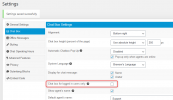
Also check if you have checked this option, this could also cause this to happen:
1613555910388.png
 
Last edited:
Thanks for your reply.

This box is already unchecked.

I don't find the solution.

When I am logged in, I see the chat on my page.

But in another browser on the same page, I don't see it.

Thanks.
 
In which mode did you install the WP Live Chat Plugin? "Standalone - No 3CX" or "3CX" and entered a "callus' link?

I'd also recommend checking in "General" if you have added the plugin to all pages.
One more thing, are you using Gutenberg blocks to add the plugin to your website?
 
did you empty browser cache?
 
I'm also having this same issue. Has anyone found a solution? 3CX Version Number 16.0.9
 
Last edited:
I'm was thinking I was having the same issue... But now it looks it takes a few hours before al the settings made in the WordPress plugin are processed. You can see the changes directly in the browser where your WordPress is active. But if you change to another browser or to private/incognito it's not directly.

Is that right support team?
 
Hi @MauriceLemmens,

With regards to the 3CX Live Chat for Wordpress plugin, any changes you make will be instant and can be seen when refreshing the page. What do you mean about changing to another browser?
 
Hi @VasilisV_3CX,

I use google Chrome as standard browser. Changes are instantly seen in my standard browser (the browser in which I make the changes while I'm logged into wordpress).

When I change to another browser or take a look at the website with my telephone, I don't see the changes immediatly. It seems to take a while. Even when refreshing/reloading and deleting cookies/history.

So I'm affraid I can't agree with you about the instant changes. But maybe its my fault and I'm doing something wrong...

Another question:
What is the fastest way to go with a client from webchat to a screenshare environment? Is it only possible by giving the client/customer a link for WebMeeting? Or is there another faster and more simple solution?
 
@MauriceLemmens,

What changes are you actioning in the Wordpress Live Chat plugin? Can you tell me the steps you're following to make the change?

To share the screen, you'd need to set up a WebMeeting yes, as the chat app allows escalation to audio / video only which does not allow screen sharing.
 
What you are describing seems like a common issue with caching. The reason you see the changes instantly when logged in is because caching plugins do not show cached content to logged in users. After making changes clear your site's cache and you should be seeing them in all browsers/devices.
 
Hi @VasilisV_3CX and @florink

Thank you for quick answering! Well, for example I change the first chat-message in the wordpress-environment. And offcourse press the "save settings" button. Not more than that. I takes a while before changes are processed so it seems. But I just tried again and this time the change was instantly processed.

I cleared the cache every time. Let's just say it was my mistake. If it happens again I will get in contact!

One last question:
Is there an option to make different first chat pop-ups for different pages on the website? Or is it only possible to make 1 common chatmessage for all the pages together?
 
Hi @MauriceLemmens,

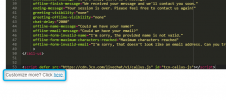
You could set up Live Chat using the HTML code generator (though it would be more work) - so you can customize it and paste it onto pages you want to have specific text. You can find the HTML code generator here.

1620037157543.png
 
Status
Not open for further replies.

Forum statistics

Threads
112,149
Messages
590,965
Members
165,170
Latest member
SupportRock