Live Chat malfunction

Status
Not open for further replies.

Emilianik

Premier Customer
Joined
Jun 3, 2020
Messages
28
Reaction score
2
I activated the live chat service, but sometimes some PC users report the impossibility of clicking on the chat icon as there is a prohibition sign as image attached. someone know what is the problem?
 

Attachments

  • error live chat.jpeg
    error live chat.jpeg
    102.6 KB · Views: 9
If the icon is greyd out and you hover your muse over it, the mouse cursor will have the "crossed out" icon, so I think this is what is happening.

For the users that are experiencing this, how are they accessing the website?

Something to point out here, if your website is accessible both as "https://www.3cx.com" and "https://3cx.com", then in the 3CX Management Console --> Messaging, in the Live Chat entry, you must enter both URLs, separated with a ';' symbol.
 
If the icon is greyd out and you hover your muse over it, the mouse cursor will have the "crossed out" icon, so I think this is what is happening.

For the users that are experiencing this, how are they accessing the website?

Something to point out here, if your website is accessible both as "https://www.3cx.com" and "https://3cx.com", then in the 3CX Management Console --> Messaging, in the Live Chat entry, you must enter both URLs, separated with a ';' symbol.
Hi, i've make more test and i've seen that the issue is only with microsoft Edge, on Chrome the live chat plug-in work correctly in edge also after reduced te security settings the live chat plug in appear but the welcome message don't load and if i try to click the mouse cursor become a deny icon. can you help me to know why? there is some compatibility issue with microsoft edge? the website is accessible only from https://www.mywebsite.it and not from https://mywebsite.it also if i entered both urls in the live chat settings
 
Last edited by a moderator:
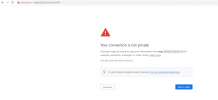
You problem is the Certificate of your 3CX Server....
1618921003075.png

Fix this and the Live Chat should also start working.
 
can you tell me how change the cerficate with another one? and also why on chrome it work fine but only on microsoft edge the chant don't work?

thank you
 
For me it doesn't work fine on Chrome either, that's what I used to track the problem down.
You have probably manually imported the certificate or added some kind of exclusion on your Chrome, which most other users in the world won't do.

As to how to change/renew your certificate, I think you should have a word with your 3CX Partner or whoever set 3CX up for you.
Changing/renewing certificate is one of those things that if you have to ask how it is done, it may be better to leave it to someone more expert on the matter.

That at least is my advice.

If you really need the steps, you can see an older discussion here:
https://www.3cx.com/community/threads/renewal-public-certificate-ssl.79180/

Important: Make sure that the certificate you use is for the FQDN you have installed 3CX with, because currently you have installed 3CX with FQDN A, but using the Certificate for FQDN B.


Now, of course if you don't want to have to bother with this ever again, you could:
  1. Make a FULL backup of 3CX with out the "License Key & FQDN" option checked
  2. Uninstall
  3. Release the FQDN from your License Key from https://customer.3cx.com
  4. Re-install 3CX and restore your backup
  5. During the installation choose a 3CX FQDN and finish the installation
  6. Reprovision all 3CX Apps and IP Phones and Live Chat
I know this may be a bit more time consuming, but by doing it, as long as your maintenance is up-to-date, you will never have to worry about certificates expiring ever again.
 
thank you, for chrome i've make some test on more pcs with chrome i can click on chat, approve gdpr and start chat with operators.
 
I don't know then why on my Chrome (v90.0.4430.72 by the way) it doesn't work, but the above is what you need to do.
 
Status
Not open for further replies.

Forum statistics

Threads
112,149
Messages
590,965
Members
165,170
Latest member
SupportRock