Live Chat on Wix website

Status
Not open for further replies.

sueblush

Free User
Joined
Apr 9, 2021
Messages
3
Reaction score
2
I am trying to add the live chat to my Wix website but after following all the steps the live chat icon is greyed out.
 
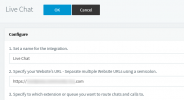
In your Management Console --> Messaging, in the Live Chat entry, have you correctly add your website URL?
1617951319085.png

Also, make sure that the HTTPS port of your 3CX Installation is publicly accessible.

[EDIT]
Although I am not very familiar with Wix websites, I think they may involve other FQDNs as well, so remember that you can comma-separate more than one FQDNs.

To give you clues, you may want to open Chrome and press F12 to open developer mode, then while in the Console section load your website and see what error it gives you.
 
Last edited:
  • Like
Reactions: VasilisV_3CX
Thank you for your response, I checked the domain in the developer tools and added the filesusr.com version and that seems to do the trick. Thank you again!
 

@NickD_3CX I am wondering if you are able to help me again. The chat seems to be working ok, Thanks again, but for some reason, the chats are not registering in the Queue we have set up for it. It doesn't show that a chat was serviced or that a chat is waiting etc. We have set up for a chat to go to the longest waiting agent and none of that seems to work. Are we not able to do this with Queue setup?​


@NickD_3CX I am wondering if you are able to help me again. The chat seems to be working ok, Thanks again, but for some reason, the chats are not registering in the Queue we have set up for it. It doesn't show that a chat was serviced or that a chat is waiting etc. We have set up for a chat to go to the longest waiting agent and none of that seems to work. Are we not able to do this with Queue setup?​

Hi!

When you have Messages (Live Chat, SMS, Facebook) going to a Queue, the Polling Strategy makes no difference.

If there are logged in Agents, when a new Messages arrives, in their WebClient or Mobile App they will see it in the "Chat" section. Once an agent "takes" the chat, the others can no longer see it, only Queue Managers that have the "Monitor" ability.

This is how it works.
After sending a chat, what does the Web Visitor see? Also, if you log into the Web Client of an Agent in the Queue and go to "Chat", do you see something there?
 
Status
Not open for further replies.

Forum statistics

Threads
112,149
Messages
590,965
Members
165,170
Latest member
SupportRock