Solved live chat on WP site access issue

Status
Not open for further replies.

Adam Hil

SMB User
Joined
Jul 26, 2024
Messages
3
Reaction score
0
Hi all

Is anyone came across an issue that a live chat isn't well interesting on a WP site,

After plugin and activation has been done followed all instructions given,

The error seems to be "enable CORS access from server"

The way it appears on the site is, that you can see the icon for chat be it is not responding

Perhaps you can advise

Many Thanks
 
Regarding your question, please check thew website URLs that you have set under the Live chat configuration and ensure that the URL matches precisely that of the websites.
 
Thanks a lot Charles for your reply,

As per instructions given, I needed to copy a URL from my dashboard at 3cx and put it in the plugin in my dashboard at Wordpress, so it's directly on to my website, I have no control over these links

Hope that make sense

Your help is much appreciated
 
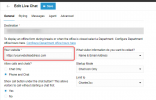
You first need to copy the website address and paste it into the Live Chat config within 3cx exactly as it is in your browser address bar when you access your site and press save.

1722009039351.png


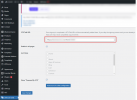
Then copy the link form the 3CX Live chat

1722008885671.png


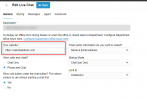
And finaly past this into the 3CX Live Chat wordpress Plug in and save the changes.

1722008976404.png
 

Attachments

  • 1722008716320.png
    1722008716320.png
    25.8 KB · Views: 2
Hello Dear Charles

Thank you for clear instructions and screenshots, i followed the steps and copied my web address and paste it into the destination as shown (not typing it) and it is indeed worked out

Sincerely appreciate your help and support
Have a nice weekend
Adam
 
You are welcome. I’m glad this now working for you,

Enjoy.
 
Status
Not open for further replies.

Forum statistics

Threads
112,147
Messages
590,959
Members
165,167
Latest member
Finatra.us