


- Joined
- Jul 12, 2019
- Messages
- 15
- Reaction score
- 3
HI,
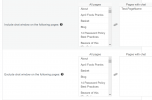
I'm trying to configure the Live Chat for testing and want to show it only on one page but I'm a bit confused by the Include and Exclude options in the Wordpress Widget.
To have the widget on Test-PageName do I need it in the right-hand box only for both of these questions, or for the exclude question should it be the only one in the left box?
The fact that both questions have a box entitled Pages With Chat makes it a bit confusing
I'm trying to configure the Live Chat for testing and want to show it only on one page but I'm a bit confused by the Include and Exclude options in the Wordpress Widget.
To have the widget on Test-PageName do I need it in the right-hand box only for both of these questions, or for the exclude question should it be the only one in the left box?
The fact that both questions have a box entitled Pages With Chat makes it a bit confusing


