Live Chat URL

Status
Not open for further replies.

Gabba-Gool

Free User
Joined
Feb 19, 2024
Messages
7
Reaction score
0
Hello, I'm using Live Chat without issue on my web browser. Within my website I have contact page with a 'Live Chat' link which currently opens 3CX live chat in a separate window. What I'm trying to accomplish is to have the url link open or expand the actual plugin on the page instead of opening another instance. Is this something I'm able to accomplish? I attached a screenshot for reference.

Thank you.
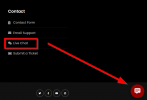
2024-05-01 17_54_31-Home – Gabba-Gool - Work - Microsoft Edge.png
 
This depends on whether you have enabled on your website the option to show the chat box on all or on specific pages. For more information please also check here.
 
I have it set to enable on all web pages. What I’m trying to accomplish is having my “Live Chat” link expand the Live chat just like it would if I select the chat bubble icon.
 
You want this to redirect for example to another page instead of opening a chat box?
 
No. I’m not looking to redirect. I just want the link to expand/open the live chat plugin like it would do if I actually clicked on the live chat icon on the bottom right of the page.
 
This is how it should work, in your case what is the result?
In F12 on your browser what is the error?
 
I attached a pdf of a few screenshots to help explain what I'm currently seeing. I hope this helps and I appreciate your support.
 

Attachments

Status
Not open for further replies.

Forum statistics

Threads
112,147
Messages
590,959
Members
165,167
Latest member
Finatra.us