Solved Locked out, again...tried options in other threads!

Status
Not open for further replies.

atradem0

Customer
Joined
Jul 5, 2021
Messages
4
Reaction score
1
Background: New user, three extensions, all are blocked because of "wrong user name and/or password"

I have the *(){(_UY&(*^)*&% problems with 3CX locking me out (user error, I am sure) - but it appears to be totally hosed-up now.
1. I can log into the main customer portal
2. I can't get to my Dashboard to delete my blocked (internal) IP address
3. I can change the password (found the password reset) for the customer portal - but I still can't get to my Dashboard to delete (internal) blocked IP address
4. I've gone out with a new WAN IP address - and logged into a webclient - but can't get to the Dashboard to delete my blocked IP address

There appears to be no recovery (set a new password) on the local (internal) IP address to my onsite 3CX server webpage
The customer portal doesn't seem to propagate the new (reset) password to my onsite 3CX server

What do I do (besides throw my server out the window!!!)? <grin>

I thought I was pretty technically proficient, but 3CX has made me doubt all my networking knowledge...and I'm calling a psychiatrist to schedule a consultation as my ego has been totally shattered by this experience.

Thank you!!!
Charles
 
a) The customer portal credentials are not the same as your instance credentials.
b) From another provider (LTE? another wifi?) load your 3CX page. Enter username "admin" and a wrong password TWICE. After the second failed attempt you will get a button to have the Management Console password sent to the admin email.

Now you should be able to login (from the LTE) to the management console and remove the blacklist of your main ip.
 
  • Like
Reactions: atradem0
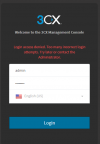
I tried that (thank you!!!), but I have another error message now:
1625516816248.png

When I log into my onsite (instance?) 3CX server I never get a button to get a password reset :o
 
That IP appears to be blacklisted already. So try it from a fresh IP (internal or external) and then you should get the password reset prompt
 
  • Like
Reactions: atradem0
1) Thank you for trying to help!!!!!!!!!!!!!!! :) :) :) :)
2) I still cannot get in
3) I have tried two other laptops on my internal network and one VPN'd outside my network.
-- First time: I enter admin then a bogus password (it doesn't give me the "too many attempts" error, just "incorrect username or password")
-- Second time: I enter admin a second time - no pop-up for Forgotten Password
-- Third time: I enter admin a third time - and I am booted out with "Login access denied. Too many incorrect login attempts" (and still no "Forgotten Password" popup box)
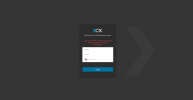
4) I switched to Microsoft Edge (yuck), but it provided me with a 'view' password 'eyeball' (that's good to know) - but there is NO Forgotten Password popup anywhere on my screen (large screen to show it is nowhere to be found. "Where" is the forgotten password box/indicator supposed to show-up??

1625523810626.png
 
To allow us to better understand the situation and a few things you could try:

1. Is the 3CX PBX on the same LAN as the different laptops you are trying or is it somewhere else completely? (Another office, hosted, etc)

2. How are you accessing the 3CX Management Console? Are you using the FQDN(https://domain.3cx.com:5001) or the local IP(https://10.10.10.1:5001). If your laptops are on the same LAN as the PBX, try the local IP instead. If you do get in, check all blacklisted IPs and remove any you recognize being yours.

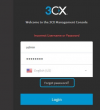
3. The forgotten password option should appear on your second failed attempt. Both failed attempts should've been using the correct username. It looks like this:
1625557781357.png

4. I know you mentioned using different laptops, but since we have seen it in the past make sure there are no browser extensions that may be interfering such as password managers ,etc.

EDIT: Are you not getting the "Forgot Password" option at all after the second failed login attempt? If not, It may mean the username you are using is not the correct one as mentioned in step 3.
 
  • Like
Reactions: atradem0
SUCCESS!!!! THANK YOU!!!!!!!
What a noob I am!!!! (of course :) )
- When I read to input the 'admin' username, I read it as "Use *admin* as your username" (even though I do not use *admin* as a username in my system).
- I still managed to make another mistake along the way...details below (I failed in step 3)


Steps (don't waste your time reading if you are already smart on these!!! LOL!!!)
1) I got *another* laptop up - pointed browser to login-in page - got the "Forgot Password" link on 2nd try...clicked on the "Forgot Password" link. [Another laptop because my DHCP server has reserved/static IPs for my computers/laptops and I can't change IPs easily]
2) Returned to my Main Computer - got an email sent to my recovery email address telling me that my original login/password were back in order
3) Opened browser on my main computer - thinking that all was good - tried to login BUT I was still blocked (main computer was still on blacklist, right? :) )
4) Returned to the laptop in step 1 above - back to the page where I had failed two times, but the third time I used the original login/password and got in.
5) Sorted Blacklist to get my local IP address range and removed all my blacklisted local IPs
6) Returned to main computer and I am in!!!!!!!!!!!!

THANK YOU!!!!!!
My NOOB mistake of taking "admin username" literally was my error, thank you for being persistent (and helpful) to this new user. I hope I can return the help/favor (or pass it on) in the future!!!!

Charles
 
  • Like
Reactions: ChrisC_3CX
Excellent!
Glad to see you managed to resolve this issue!:)
 
Status
Not open for further replies.

Forum statistics

Threads
111,974
Messages
590,081
Members
164,899
Latest member
mazet