Solved Login Windows - Linux

Status
Not open for further replies.

smokie

Forum User
Joined
Jun 22, 2019
Messages
54
Reaction score
2
Hello all

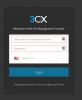
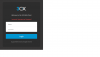
I am new at this and i am having sleepless nights - I have installed v16 on a windows10 box and also v16 via the iso supplied, a linux box. On the windows box the login console is slightly different than the linux login screen. I can login into the widows box with no problem but the linux box I have tried so many passwords but i still get the "Incorrect Username or Password" Please can somebody shed some light on this please. Thanks
 

Attachments

  • Linuxlogin.png
    Linuxlogin.png
    14.4 KB · Views: 6
  • Win10login.png
    Win10login.png
    17.3 KB · Views: 6
Hi,
Linux and windows login pages are the same.
surely on linux you used previously extension web client which is not management console. So check the URL you are trying to connect to, change it to the right one and with right credentials it should go
 
Last edited:
try on linux side https://FQDN/#/login

This is a capture from Linux PBX, this is the same your Windows one
11241
 
Hi

I chose the same user/passw. for both installs.
 
Hi,
Linux and windows login are the same.
surely on linux you used previously extension web client which is not management console. So check the URL you are trying to connect to, change it to the right one and with right credentials it should go

Ok cool french lol, but I did everything as per the setup steps
 
What do you mean , if you open your Browser and type https://your fqdn/#/login , you can't go on management console login page?
 
  • Like
Reactions: smokie
  • Like
Reactions: AWS2P
english is not your native ?

each time you use your browser , it keeps in mind the url you were connected to previously, so take care when you need to switch from Console to webclient this is not same URL, this is why your credentials didn't work.
 
"when you need to switch from Console to webclient this is not same URL "
Hi I am really being slow but can you please explain the difference between the console and the webclient,
 
Console is for 3CX admin only, all pbx settings are here.
Webclient is a user interface, like a phone but available from chrome browser with lots of views, webclient credentials are not the same as console, for webclient you can find them in each extension
 
  • Like
Reactions: smokie
cool cool bananas, thanks french
 
Status
Not open for further replies.

Latest Posts

Forum statistics

Threads
111,930
Messages
589,802
Members
164,803
Latest member
fcentral