Looking for a specific polling strategy

Status
Not open for further replies.

tech10

Silver Partner
Basic Certified
Joined
Jul 7, 2010
Messages
61
Reaction score
9
I have a client who would like to set up incoming calls to ring a certain way; we are currently setting this up with cascading ring groups, but wanted to make sure I was not missing something:

Ring 201 for 7 seconds, if no answer ring 201, 202 for 7 seconds. If no answer, ring 201, 202, 211 (office manager) for 7 seconds. Again, I am currently doing this with three ring groups, but if there was a polling strategy (or something else) that would do this more elegantly, I'm all ears.

Essentially I need a "Prioritized Hunt" but that rolls to the next number in the Hunt list after X seconds, adding more users that can answer the call as it rolls down the list.

Does anyone have any thoughts/suggestions?
 
We dont have any such polling strategy.

Going from one queue to another will royally mess up your statistics as it will go from one queue to another leaving an abandoned call as it goes.

You may be better off using the skill based routing strategies where if an agent is busy on a call or logged out it will go to the next skill set. but this will not happen if the agent is just not answering.
 
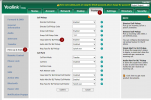
Well, if you use Yealink-phone, you might be able to use these settings:
1722506995898.png

If someone in your group receives a call, the other phones display that silently.
Especially an office manager will (probably) notice the phone screen changing and take over the call eventually. And you can also enable the 'audio alert' of course.
It's not what exactly you asked of course (you already got an answer from 3CX) and maybe not really a replacement, but sometimes it works well so I thought I'd mention it anyway :)
 
Well, if you use Yealink-phone, you might be able to use these settings:
View attachment 42928

If someone in your group receives a call, the other phones display that silently.
Especially an office manager will (probably) notice the phone screen changing and take over the call eventually. And you can also enable the 'audio alert' of course.
It's not what exactly you asked of course (you already got an answer from 3CX) and maybe not really a replacement, but sometimes it works well so I thought I'd mention it anyway :)

That would be better configured from the PBX itself as a "Custom Speed Dial" BLF key, as anything configured on the phone would be overwritten by the PBX on the next provisioning cycle (every 24 hours)
 
That would be better configured from the PBX itself as a "Custom Speed Dial" BLF key, as anything configured on the phone would be overwritten by the PBX on the next provisioning cycle (every 24 hours)
I don't believe that's entirely true. From my own experience, only settings that are in the config file generated by the PBX are overwritten. If a setting is not mentioned in the CFG, it is not changed according to me :)
 
This is easily achieved with a BLF key, so in the case a phone is reset for whatever reason the configuration can easily be retrieved.

I also see this from a support perspective, and ease of use for the customer and partners, because if something is configured in a non standard way, we get the complaint. So to avoid complaints, we give methods that are conforming to the baseline.
 
We dont have any such polling strategy.

Going from one queue to another will royally mess up your statistics as it will go from one queue to another leaving an abandoned call as it goes.

You may be better off using the skill based routing strategies where if an agent is busy on a call or logged out it will go to the next skill set. but this will not happen if the agent is just not answering.

I am using Ring Groups, not Queues for this right now. This is for users that are not always sitting at their desk; having these users manually log out of the queue every time they leave their desk won't work.

That said...is there a way to link Teams status w/ Queue login? So that when their Teams status changes when they walk away from their desk, they are automatically logged out of a Queue?

noord - Interesting; does that Visual Alert show the caller ID of the incoming call? What does it do differently than if it was not set? I tend to shy away from stuff that is not done in the 3CX portal for production, but it sounds like an interesting feature.
 
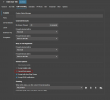
Yes, you can have your 3CX status linked to your queue log in status.

It is just a simple option in each users forwarding rules.

1722519845934.png

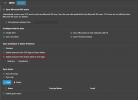
You will just need to sync the Teams to 3CX presence sync.

1722519909991.png

Please make sure you authorise your connection!

I tend to shy away from stuff that is not done in the 3CX portal for production
Thats a good practice!
 
Status
Not open for further replies.

Forum statistics

Threads
111,953
Messages
589,909
Members
164,845
Latest member
tdzski5