- Joined
- Sep 22, 2024
- Messages
- 19
- Reaction score
- 8
Hi all,
We are encountering an issue with the M365 integration after upgrading to v20.
I have already deleted the application on the Azure side to reconfigure the integration from scratch, but we are still experiencing the same problem.
Screenshot:

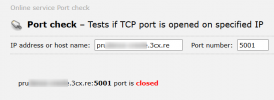
Port 5001 is accessible from the outside, so I don’t understand this sync error.
For your information, the integration was working perfectly in v18.
Regards,
We are encountering an issue with the M365 integration after upgrading to v20.
I have already deleted the application on the Azure side to reconfigure the integration from scratch, but we are still experiencing the same problem.
Screenshot:
Port 5001 is accessible from the outside, so I don’t understand this sync error.
For your information, the integration was working perfectly in v18.
Regards,