M365 - 3CX v20 issue after v20 upgrade

PC974

Premier Customer
Basic Certified
Joined
Sep 22, 2024
Messages
18
Reaction score
8
Hi all,

We are encountering an issue with the M365 integration after upgrading to v20.
I have already deleted the application on the Azure side to reconfigure the integration from scratch, but we are still experiencing the same problem.


Screenshot:

1754921188011.png

Port 5001 is accessible from the outside, so I don’t understand this sync error.
For your information, the integration was working perfectly in v18.

Regards,
 
  • Like
Reactions: jed
Hello Alejandro, the port is open, TCP 5001 is fine, as I can connect to it from outside.
We just block ping.


Strangely, from time to time the test works...


I will check with my hosting provider to see if they notice any issue on the firewall.


Regards
 
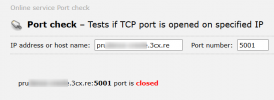
when checking your fqdn there, the https port 5001 is closed, that means it is restricted or closed in the firewall.

1754922303204.png
 
  • Like
Reactions: jed
yes , but the port is open , u can try a telnet , it's ok.
And i can connect to the webclient / admin.
 
You probably are using Geo IP location or any access list, that is why you can enter via the web client but that port is not opened publicly, that is why it is shown closed when testing it.
 
  • Like
Reactions: jed and Evolute IT
Indeed, it was a new GEOIP restriction from our provider… after reviewing it with them, everything is now fine.
You can close the ticket.
Thank you.
 
Indeed, it was a new GEOIP restriction from our provider… after reviewing it with them, everything is now fine.
You can close the ticket.
Thank you.
Glad to know it is working now.

Have a great week ahead!
 
  • Like
Reactions: PC974

Members Online Now

Forum statistics

Threads
111,832
Messages
589,285
Members
164,662
Latest member
DejanMDS