- Joined
- Sep 28, 2020
- Messages
- 11
- Reaction score
- 5
Hi, Support.
Our M365 integration is broken and would appreciate some assistance in resolving it.
Firstly - We recently upgraded our instance to V20 (build 715). This didn't break it but just info for background.
Secondly - Do we need an enterprise license to sync Teams presence to 3CX softphone? The pricing isn't clear as we're using the pro license with M365 integration anyway, so I would assume the Teams presence sync feature should just work?
Thirdly - I believe I broke M365 integration trying to get presence to sync.
Under Users > M365 I noticed 'Sync Calendars & Teams Presence' was enabled with 'Update presence from Teams clients to 3CX Apps'. But this was not working so i clicked 'Deauthorize', and then 'Authorize'. This prompted me to sign in using my M365 account, which i did but then nothing happened.
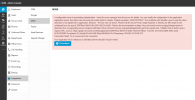
After that the Integration broke and when i navigate to Integrations > M365 I'm presented with the attached error.
Interestingly, the Application ID is not actually correct. How do we change the App ID of the integration? I can see what its supposed to be when i logon to Azure > Enterprise Apps.
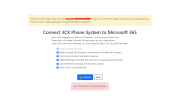
The only option I have is 'Reconfigure', but when i click 'Connect' it says 'Error: Permission entry already exists.' (Also attached).
I read on the forums that I need to backup the config, and remove 'OFFICE365_CONFIG' parameter, then restore the backup to remote the integration settings so I can start again. However, when I click Backup I'm presented with another error: 'Unable to retrieve current list of backups. Please try later.' If i click 'Retry', nothing happens, and when i try to actually backup the config I'm presented with 'Internal server error occurred. Please contact administrator.'
So can you confirm how to either resolve the M365 integration issue without needing a backup, or advise how we can resolve the backup issue so we can backup the config. To be honest, this needs to be working anyway and not sure why its not, but its only post migration to V20 that backups are broke.
Thank you,
James Stoner
Our M365 integration is broken and would appreciate some assistance in resolving it.
Firstly - We recently upgraded our instance to V20 (build 715). This didn't break it but just info for background.
Secondly - Do we need an enterprise license to sync Teams presence to 3CX softphone? The pricing isn't clear as we're using the pro license with M365 integration anyway, so I would assume the Teams presence sync feature should just work?
Thirdly - I believe I broke M365 integration trying to get presence to sync.
Under Users > M365 I noticed 'Sync Calendars & Teams Presence' was enabled with 'Update presence from Teams clients to 3CX Apps'. But this was not working so i clicked 'Deauthorize', and then 'Authorize'. This prompted me to sign in using my M365 account, which i did but then nothing happened.
After that the Integration broke and when i navigate to Integrations > M365 I'm presented with the attached error.
Interestingly, the Application ID is not actually correct. How do we change the App ID of the integration? I can see what its supposed to be when i logon to Azure > Enterprise Apps.
The only option I have is 'Reconfigure', but when i click 'Connect' it says 'Error: Permission entry already exists.' (Also attached).
I read on the forums that I need to backup the config, and remove 'OFFICE365_CONFIG' parameter, then restore the backup to remote the integration settings so I can start again. However, when I click Backup I'm presented with another error: 'Unable to retrieve current list of backups. Please try later.' If i click 'Retry', nothing happens, and when i try to actually backup the config I'm presented with 'Internal server error occurred. Please contact administrator.'
So can you confirm how to either resolve the M365 integration issue without needing a backup, or advise how we can resolve the backup issue so we can backup the config. To be honest, this needs to be working anyway and not sure why its not, but its only post migration to V20 that backups are broke.
Thank you,
James Stoner