- Joined
- Dec 17, 2018
- Messages
- 20
- Reaction score
- 3
Hi All
Having used 3CX with M365 integration a number of times successfully we are testing for another use case scenario and have come across a strange problem.
M365 sync has been configured successfully and some accounts are brought across from M365 in to 3CX, these accounts all have both their M365 username and default email address set to the same value and are in the format [email protected] so no problem there...
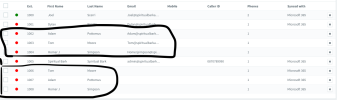
However, there are users within this M365 tenant that have their username set to [email protected] as they use the original tenant id for authentication but then have their default email address set as @companyname.co.uk. This users do not sync across despite being selected within the user sync options (we need to use the 'only sync these users' option.)
We've tried manually creating extensions with the email address set to the @company.onmicrosoft.com address and also just leaving there being no extension but these 'onmicrosoft' accounts just never sync.
I appreciate that we 'could' change the user name elemet in M365 but there are a couple of instances where this is currently not possible for a number of reasons.
Also, we need to use M365 signin as in this instance we need to enfource MFA at signin (obviously it would be really great for 3CX to delivery the essential MFA for both admin and user signing asap as a separate item!)
So, anyone got any suggestions on this?
Thanks
J.
Having used 3CX with M365 integration a number of times successfully we are testing for another use case scenario and have come across a strange problem.
M365 sync has been configured successfully and some accounts are brought across from M365 in to 3CX, these accounts all have both their M365 username and default email address set to the same value and are in the format [email protected] so no problem there...
However, there are users within this M365 tenant that have their username set to [email protected] as they use the original tenant id for authentication but then have their default email address set as @companyname.co.uk. This users do not sync across despite being selected within the user sync options (we need to use the 'only sync these users' option.)
We've tried manually creating extensions with the email address set to the @company.onmicrosoft.com address and also just leaving there being no extension but these 'onmicrosoft' accounts just never sync.
I appreciate that we 'could' change the user name elemet in M365 but there are a couple of instances where this is currently not possible for a number of reasons.
Also, we need to use M365 signin as in this instance we need to enfource MFA at signin (obviously it would be really great for 3CX to delivery the essential MFA for both admin and user signing asap as a separate item!)
So, anyone got any suggestions on this?
Thanks
J.