MACOS - Desktop App Problem with Yealink WH66 after Update

Status
Not open for further replies.

Oliver B.

Bronze Partner
Basic Certified
Joined
Mar 23, 2022
Messages
2
Reaction score
0
Hello,

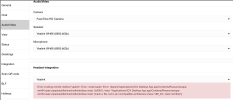
after we updated our on-premise 3CX Server on Debian to the latest Version 18.0 Update 4 (Build 965) we cannot use our Yealink WH66 Headset together with the Desktop App anymore.
It fails to load with the following error:
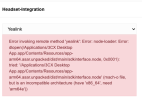
Yealink_WH66_Error_01.png
All Versions are up to date. Reinstalling is not fixing the issue.

In case you use the same combination refrain from updating your 3CX Server and wait till this issue is fixed.
Webclient is working fine so far.

brgds
-Olli
 
Hi Olli,

Could you please let us know what versions of MacOS you are currently running and also what model Mac you are using?
Also please mention the Desktop App version that is installed and make sure that the Yealink WH66 is running the latest firmware (should be 125.432.0.15 at the time of writing).
 
Hi Nick,

no problem. MacOS: Monterey, Version 12.4 on a Macbook Pro (16", 2021) M1 Max Chip
Desktop-App: 18.9.993
Yealink HS is up to date running Version 125.432.0.15

Please to hear.
 
Hi Nick,

no problem. MacOS: Monterey, Version 12.4 on a Macbook Pro (16", 2021) M1 Max Chip
Desktop-App: 18.9.993
Yealink HS is up to date running Version 125.432.0.15

Please to hear.
Hi,

We have the same problem on our installation, looks like it is trying to load the x86 intel version while it should load the arm-based version on the M1 based macs.

The web-based yealink connection works fine.

To confirm this broke on the latest update, it was working correctly on the previous version of the desktop app.

Kind regards,

Tjardick
 

Attachments

  • Screenshot 2022-07-19 at 09.02.45.png
    Screenshot 2022-07-19 at 09.02.45.png
    681.5 KB · Views: 4
Hello, i have a mac m1 too and will install the 3cx update this night. At my mac both 3cx DesktopAPP and Yealink USB Connect runs as intel. Is there an update for the Desktop app with update to 18.0 U4? Does 3cx have updated the APP to ARM? When yes is there a way to install the Intel version of the MAC APP? I think the problem is can be that 3cx DesktopApp runs as native ARM and the Yealink as x86.....

Kind regards..
 
We are aware about this and will address this issue in Update 5. Until then, please use the PWA or browser WebClient.
Sorry for inconvenience.
 
Hello everyone, now i have installed the 3cx update and tested the issue. Yes i confirm the problem. But until 3cx fix it i have a workaround for you.
1. Go to your Applications Folder
2. Select the 3cx Desktop App
3. Open the Context Menu and Select "Informations"
4. In the General Area you can select "Open with Rosetta"
5. Now start the 3cx Desktop app and you will see in the Task Manager that it runs under Intel architecture.
6. Your Yealink integration will be green :)

kind Regards
 
  • Like
Reactions: pangel
Status
Not open for further replies.

Forum statistics

Threads
112,149
Messages
590,965
Members
165,170
Latest member
SupportRock