Main # SMS into queue

Status
Not open for further replies.

lritpeter

Silver Partner
Joined
Feb 8, 2023
Messages
53
Reaction score
4
Hi Team,

What is the best way to route SMS for the main number to go into a call queue? We currently have the main number attached the the digital receptionist.
 
Hi @iritpeter if the sms number is pointed to the digital receptionist then please note that you can forward the sms to the call queue.

To do so, from the web client or desktop app — go to admin panel —- call handling —- select the digital receptionist and edit it —- click on Options and there you can forward the sms to the queue.
 
  • Like
Reactions: lritpeter
Awesome! Thank you.
Hi @iritpeter if the sms number is pointed to the digital receptionist then please note that you can forward the sms to the call queue.

To do so, from the web client or desktop app — go to admin panel —- call handling —- select the digital receptionist and edit it —- click on Options and there you can forward the sms to the queue.
Perfect! Thank you!
 
  • Like
Reactions: Alejandro_3CX
If one of the queue users sends a text, is there a way for everyone else in the queue to see the thread? Issue is once the recipient responds, the queue staff doesn't know what was said.
 
within the queue you just have these two options:

1692818059532.png
 
  • Like
Reactions: GeorgeP_3CX
We currently have it set to take manually. Again, the question is more about the initial outbound text from the queue. Is there a way for everyone in the call queue to see the first message that was sent out?
 
@iritpeter the queue manager can monitor these chats and transfer them too, did you check this too?
 
@iritpeter the queue manager can monitor these chats and transfer them too, did you check this too?
Yes, I am in the queue manager but we do not see the initial message sent. We only see the response after it comes back into the queue.

For example. Out of 5 people in the queue. 1 person sends a text to 1 external customer. When the customer responds to the message it hits the queue and everyone can see the response moving forward until some takes the message. Or if no one takes the message everyone can continue to see the message thread in the queue manager. That part of it is working as expected. However, again, it's the very first message that everyone else in the queue is not able to see which is crucial to the team.

Also, how do we adjust the response times. We are getting your chat has been closed for no response.
 
it's the very first message that everyone else in the queue is not able to see which is crucial to the team.
I'm afraid this is not possible.

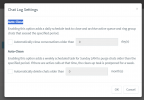
Regarding the autoclose please check the chat logs ---- settings from the pbx management console

1692930526722.png
 
So you are telling me. If an agent in the call queue said they texted a customer and the customer calls in to complain that they never got the message. There is no way for the queue manager to validate it? There is no way to get a report to prove that said text was sent?

I can not find that chat log settings. Please advise.

Thank you!
 
Found it. Looks like Chat Logs need to be enabled. Then those settings show up.

1692989674707.png

More show when that is enabled. It will give the Administrator the rights to see all business text messages. Is it possible to create a system user to maybe provide more granular access control for viewing the messages?
 
Status
Not open for further replies.

Forum statistics

Threads
112,065
Messages
590,592
Members
165,019
Latest member
rsaldin@advancedbrainspin