Management Console control of Personal Phonebooks?

Status
Not open for further replies.

jcsfish

Forum User
Joined
Aug 11, 2021
Messages
8
Reaction score
0
I've searched high and low for an answer on this but can't find an answer...

I want to be able to add/remove contacts to extensions PERSONAL contacts.

I'm well aware of how to edit the company contacts very easily, but it appears on the user can amend their own personal contacts?
 
Correct.

There are a few types of address books in 3CX - Why would you prevent users changing their own contacts?

Company - public managed by 3CX
Personal - private managed by user
CRM
365
 
Correct.

There are a few types of address books in 3CX - Why would you prevent users changing their own contacts?

Company - public managed by 3CX
Personal - private managed by user
CRM
365
Thank you for your reply

I don't want to prevent them changing their own, I just want the ability to add/remove contacts to their personal

Our situation is this - we have a HR team that needs all staffs personal phone numbers in their 3CX phonebook.
The easy way is to just import these to the company phonebook, but then this means every 3CX user can see the personal phone numbers of staff, which we cannot allow for GDPR reasons.

So ideally I would like to be able to import these to their personal contacts, so only the HR team can see them
 
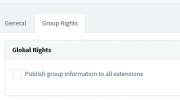
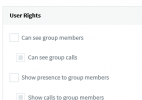
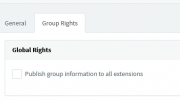
Hows about setting up dummy extensions for each user with their mobile number configured and forwarding rules set up. Then put them in a group and uncheck the following:

You'd need to enable the option to show unregistered extensions in the web client like.. and hide the dummy from the address book

1633610372413.png

1633610404305.png


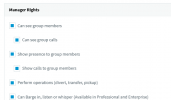
Then add your HR Team in to this group as manager.

1633610432235.png

Failing this, you could use custom templates to import another address book.
 

Attachments

  • 1633610354327.png
    1633610354327.png
    3.6 KB · Views: 3
Hows about setting up dummy extensions for each user with their mobile number configured and forwarding rules set up. Then put them in a group and uncheck the following:

You'd need to enable the option to show unregistered extensions in the web client like.. and hide the dummy from the address book

View attachment 24943

View attachment 24944


Then add your HR Team in to this group as manager.

View attachment 24945

Failing this, you could use custom templates to import another address book.

You've lost me... how does this enable me to control their personal comtacts?
 
You've lost me... how does this enable me to control their personal comtacts?
It doesnt, and it's pretty long-winded and not really ideal I suppose.

You could set up all numbers in the personal address book, export it and then import on the other phones.

Or you'd need to make a custom phone template that pulls these contacts in
 
  • Like
Reactions: Evolute IT
Status
Not open for further replies.

Forum statistics

Threads
111,976
Messages
590,089
Members
164,904
Latest member
gdstratton