Managing Scheduled Reports and Optimizing Database Performance

Status
Not open for further replies.

mlawgeorge

Premier Customer
Basic Certified
Joined
Nov 16, 2015
Messages
20
Reaction score
0
Dear Team,

We are currently experiencing some issues with our 3CX system that are impacting our operations. We have encountered difficulties with managing scheduled reports within the system. Specifically, we are unable to delete scheduled reports ahead of their run time and cannot stop a report once it has started. This has contributed to high disk utilization, resulting in system slowness and degraded call quality.

We would appreciate your guidance on the following issues:

Deleting Scheduled Reports: Is there a way to remove scheduled reports from the system before they are due to run? This feature would be incredibly helpful for preventing unnecessary reports from consuming system resources.

Optimizing Database Performance: We are also looking for advice on how to manage our database more effectively. Specifically, we would like to know the best practices for exporting and archiving data that is beyond a certain age to keep the database light and performant in a production environment.

Any insights or recommendations you could provide would be greatly appreciated. We are keen to resolve these issues promptly to maintain our system’s efficiency and call quality.

Thank you for your assistance.
 
  • Like
Reactions: Evolute IT
Hi there.

Since you mentioned about scheduled reports i assume you are on V18.

Deleting Scheduled Reports: Is there a way to remove scheduled reports from the system before they are due to run? This feature would be incredibly helpful for preventing unnecessary reports from consuming system resources.
So if the report is scheduled and you delete it, it will be done from the 3CX System and it won't run as the phone system will check its events.

Optimizing Database Performance: We are also looking for advice on how to manage our database more effectively. Specifically, we would like to know the best practices for exporting and archiving data that is beyond a certain age to keep the database light and performant in a production environment.

You should not do anything directly with the database as this is not something that is supported. So taking backups is your only way to keep the copy of all the settings System have.
We advise you to archive your recordings so that they will not use a lot of space, as well as if you don't need call history/chats/faxes you could purge them periodically.
 
  • Like
Reactions: Evolute IT
Please note that even if a report is deleted, it will reappear if scheduled to run at specific intervals. Additionally, we are operating a contact center with over 350 simultaneous calls, which results in a significant growth of our CDR data. Due to this, we cannot simply purge data that is crucial for business reporting, such as quarterly performance.
 
Please note that even if a report is deleted, it will reappear if scheduled to run at specific intervals.
Yes that is expected. If you don't want that report, remove the schedule.
 
As an admin, I'm unable to view scheduled reports until they are about to run or are already running which I cannot stop. Additionally, I need guidance on how to archive CDRs since 3CX does not provide instructions for this. Can anyone assist? or a way to kill scheduled reports before they run
 
As an admin, I'm unable to view scheduled reports until they are about to run or are already running which I cannot stop. Additionally, I need guidance on how to archive CDRs since 3CX does not provide instructions for this. Can anyone assist? or a way to kill scheduled reports before they run
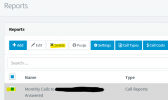
Yes you can. Under Reporting > Reports, the first section is the scheduled reports. You should be able to remove them from there before they run.

As for CDR, it's one way. But you can also wait to use v20 and the XAPI (Admin console API) which has an endpoint to get the full call log data which can be used for anything once you export it to your own database and such.
 
@mlawgeorge
You are saying you are not 3CX System super admin and can't access the Management console, but you looking to remove a scheduled report in a different way (databases etc)?
 
"I am a super admin, but I currently cannot view the report schedule before it runs. If I miss cancelling it beforehand, I cannot stop it while it's running. Worse still, I can't see which user has scheduled the report, indicating an issue with the audit log.

My goal is to completely stop scheduled reports without waiting for their scheduled run times. Additionally, I'm looking for ways to make the production database lighter by separating historical records from live or recent records. We started using 3CX in 2014 and still have all these records."
 
Doesn't seem right. It should be here:
1713557939958.png
You can't see the schedules listed at all there?
 
My goal is to completely stop scheduled reports without waiting for their scheduled run times. Additionally, I'm looking for ways to make the production database lighter by separating historical records from live or recent records. We started using 3CX in 2014 and still have all these records.
Your only way to is to keep a backup copy of the 3CX system in case you will restore it in the future to only run the reports, but on the main system you will then need to purge the call history for the past years, as there is no solution and by saving only call history, as it's all in the database.
 
  • Like
Reactions: mlawgeorge
Status
Not open for further replies.

Forum statistics

Threads
111,953
Messages
589,914
Members
164,849
Latest member
BillyAkansel