• We do not provide troubleshooting help for unsupported phones. Please try with a supported phone.
  • V20 Update 10 Alpha 2 Learn more

Maximizing audio quality

Status
Not open for further replies.

mgiara

SOHO User
Joined
Feb 19, 2022
Messages
38
Reaction score
6
Hello!

I just setup a 3CX instance hosted by 3CX (the 1 year Professional trial)
We have 1 SIP Trunk with Telnyx, and Yealink T48U's

I currently have 3 hard phones setup, with plans to expand to 16 total (10 or so T48U's and 6 or so T46U's)

There's a slight delay in the calls, which I believe is due to some old roundabout call routing that was setup by the previous IT admin.

My plan is, if possible, to remove all of the routing and simply port the businesses old number into 3CX/Telnyx.

Still however, call quality directly to the Telnyx landline number sounds digitized. I was wondering how I can fine tune the audio codecs or settings in either 3CX, Telnyx or the phones themselves to maximize audio quality. We have a 1G up/down fiber connection, and a very robust network setup, so bandwidth is not a concern. I'd prefer to push as much bandwidth as possible to maximize audio quality, if that's even an option.

What do you all suggest?

Thank you!
 
So I just made a call directly to the Telnyx number, bypassing the call routing system setup by the predecessor. The call quality is a bit better and the delay has been reduced a bit (associate says she still feels a small delay).

Inside of 3CX in settings, I see Codecs
Codec order for LAN connected devices or Apps connected to Wifi:
PCMU
PCMA
G722
G729
OPUS

in that order

Should I tweak the list?
 
Step 1 is to figure out what codecs your trunk uses. Ideally use their highest quality codec throughout. See Settings/Codecs, and also review the codecs for each phone, and of course the SIP trunks as well. Using the same codec avoids transcoding.
 
  • Like
Reactions: leejor
Step 1 is to figure out what codecs your trunk uses. Ideally use their highest quality codec throughout. See Settings/Codecs, and also review the codecs for each phone, and of course the SIP trunks as well. Using the same codec avoids transcoding.
10-4

Opened a support chat request with Telnyx to see which they support and how to configure. Once I get that info I'll do the same for 3CX and the T48U's
 
Hello,

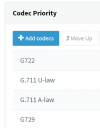
If you set up a Telnyx trunk and look at the default order, this is what you see:
1647842621989.png
- Just edit all your extensions, select their phone, and change the codec order to be the same.
- Press OK to save, then go to the general Phones page reprovision them.

- You will have to reprovision your apps to if have them deployed.
- You can do the same under the general settings of the PBX, under codecs.

Now that the extensions, the phones, the PBX and the soft clients are all in agreement, your calls should have G722 as their first priority and this should give you the maximum quality allowed by the trunk.

There is always some delay in telephony, whether cellular, VoIP or analog (inform your associate she will always feel a very small delay)
 
Hello,

If you set up a Telnyx trunk and look at the default order, this is what you see:
View attachment 28847
- Just edit all your extensions, select their phone, and change the codec order to be the same.
- Press OK to save, then go to the general Phones page reprovision them.

- You will have to reprovision your apps to if have them deployed.
- You can do the same under the general settings of the PBX, under codecs.

Now that the extensions, the phones, the PBX and the soft clients are all in agreement, your calls should have G722 as their first priority and this should give you the maximum quality allowed by the trunk.

There is always some delay in telephony, whether cellular, VoIP or analog (inform your associate she will always feel a very small delay)
So I'm not sure where in Telnyx to find supported profiles, so I'm going to take your word for that list.

Inside of 3CX, the only profiles available are G722, PCMU, PCMA and G729, so I put them in the following order:
G722
G729
PCMU
PCMA

Should I remove the last two?

After doing this, I reprovisioned all phones.

In the end, I'm realizing I only re-ordered the codecs in 3CX and pushed a provision; nothing else.
 
3CX unfortunately uses both names in different places, but:
G.711 U-law = PCMU
G.711 A-law = PCMA

Some background on bandwidth and quality: https://www.3cx.com/blog/docs/bandwidth-utilised-for-voip/

Note you can avoid transcoding by using the trunk's preferred codec throughout. Just make sure you set them in all three places as noted above.
 
  • Like
Reactions: mgiara
So I'm not sure where in Telnyx to find supported profiles, so I'm going to take your word for that list.
SIP Trunks > Select your Telnyx Trunk > Options > Codec Priority

If you add a new Telnyx trunk, the default codec order is the one I showed you previously.

In the end, I'm realizing I only re-ordered the codecs in 3CX and pushed a provision; nothing else.
That was the goal - to reorder the codecs. You do not need to remove codecs, you just need to keep them in the desired order.

Removing codecs is not a good idea, there may be cases where falling back to another codec will be needed, and if you remove them you will end up with silent calls.

Also just FYI as Steve correctly pointed out:

PCMU = G711-U
PCMA = G711-U
 
  • Love
Reactions: mgiara
Status
Not open for further replies.

Forum statistics

Threads
112,149
Messages
590,964
Members
165,170
Latest member
SupportRock