• We do not provide troubleshooting help for unsupported phones. Please try with a supported phone.
  • V20 Update 10 Alpha 2 Learn more

Solved Maximum Number of BLF Fields

Status
Not open for further replies.

derdaniel

Customer
Joined
Aug 6, 2021
Messages
13
Reaction score
2
Hello,

it's me again...
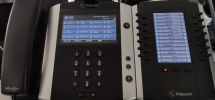
I am using a Poly VVX601 with the EXP50 Expansion module. Even while beeing able to configure more than 50 BLF Keys, it only shows the configured keys up to 49.

Any Ideas ?

Thanks and best regards

Daniel
 
Hi Daniel,

The VVX601 will reboot in order to reprovision itself. Just to be sure, did you reprovision the phone after adding more than 50 non-blank BLF entries?
 
Hi John,

in fact, there are not 50 non-blank BLF entries. I haven't configured all but those:
1
16/17 (Top left of first page)
30 (Top right of first page)
44 - 58 (Only 44 - 49 show up on the Top left of 2nd page)
72 (should be top left of page 3, but does not appear as well)
86 (should be top right of page 3, but does not appear as well)
99
108 (to check if that will appear somewhere)

And yes, I have reprovisioned the phone, otherwise it will not accept any changes as far as I have seen (apart from the daily automativ reprovisioning which I believe takes place every 24 hours)
 
Hi Daniel,

From my own testing I think that model ignores any blanks and any duplicate entries, and groups the rest together.

So in order to populate 50 positions, you must have at least something in each position and they all need to be unique entries.

I have provisioned one with 50 BLFs total and they all appeared

BLF 1-16 appears on the phone
BLF 17-50 appears on the expansion module
 
Hello John,

thanks for your reply. Would you mind telling me the firmware version your phone is using ? I also tested it with all filled with individual entrys, no change.

Also I am wondering how you managed to have BLF 1-16 appear on the Phone. The space on the top left is filled with the Extension Information. This might be the reason you manged to have 50 entries. Did you try also to fill e.g. BLF 55 and have it show up on the expansion module ?

Thanks and best regards

Daniel
 
Hi Daniel,

Sure, it's the latest 3CX-supported version 6.4.1.2280 so if you are on a different version make sure to upgrade to this one. I'm also running this on our latest stable PBX V18 (18.0.0.1880)

Also I am wondering how you managed to have BLF 1-16 appear on the Phone. The space on the top left is filled with the Extension Information.

You are correct actually, the first one is my line key so BLF 1-15 appears on the main screen

I've also added upto 75 BLFs on it now and they use the phone screen entirely, and the rest span across all 3 pages on the Expansion module (shown page 1 here)
1628756051811.png
 
Thanks for the Picture, at least, I found the reason for our different results.

You are using BLF, I am using Custom Speed Dial. Adding a BLF entry at e.g. 53 showed up.

Sorry for my wrong wording in my initial post :(
 
No problem Daniel, happy to hear you found what you needed!
 
Well, I haven't found what I needed ;)
My problem is in fact, when adding Custom Speed Dial entries in the BLF section those at entry > 49 won't be populated on the expansion module.

I hope that is more clear now.
 
Hi Daniel,

Thanks, yes it's more clear. I have added 99 entries to the phone as Speed Dials and I can now replicate the same behavior: it only shows the speed dials up to entry number 49.

We will look further into this.
 
Hi Daniel,

After contacting the manufacturer we were informed that this is indeed a phone software limitation regarding the maximum number of "Speed Dials" specifically.

We will update out guide to show the limitations: Speed Dial, Agent Login/Logout, Change Status keys can only go on BLF positions 1-49

The rest of the ~200 possible positions can be BLF type entries
 
Last edited:
  • Like
Reactions: Evolute IT
Status
Not open for further replies.

Forum statistics

Threads
112,147
Messages
590,959
Members
165,167
Latest member
Finatra.us