"maximum wait time" in call queues

Status
Not open for further replies.

Mora

Customer
Joined
Apr 12, 2022
Messages
49
Reaction score
5
Let's say I have these users:
  • John
  • Jane
  • Michael
  • Dianna
1st level call group is:
  • John
  • Jane
2nd level call group adds Michael, so it is:
  • John
  • Jane
  • Michael
3rd level call group adds Dianna, so it is:
  • John
  • Jane
  • Michael
  • Dianna
Now let's say John and Michael is talking on the phone - Jane is not at her desk, but her status is "Available" and Dianna is ready to answer calls. An incomming customer now has to wait at least 30 seconds (per 3CX "maximum wait time" 15 seconds) before reaching Dianna.

Maybe I got this wrong, but this doesn't make sense - having "maximum wait time" to be at least 15 seconds. In above situation I would set it maximum to 6 seconds (two rings) for "maximum wait time" - this will take a customer to wait 12 seconds (four rings) before reaching Dianna.

I'm comming from Avaya, where there were no minimum of "maximum wait time" (call overflow time).

Am I missing something? Why is there a limit of 15 seconds in "maximum wait time"?
 
Hi Mora,

What you could try is put all these users in a queue with the polling strategy set to prioritzed hunt.
Arrange the agents in the Agent pane in the same order as you stated them above with a ring timer set to 6 seconds(2 rings)
Effectively this means that starting from john it would only take 18 seconds before the caller reaches Diana if all other users are busy or not answering.
I havent used this myself but a bit off googling got me to this scenario maybe it works in the way you want it to.
 
Hi Mora,

What you could try is put all these users in a queue with the polling strategy set to prioritzed hunt.
Arrange the agents in the Agent pane in the same order as you stated them above with a ring timer set to 6 seconds(2 rings)
Effectively this means that starting from john it would only take 18 seconds before the caller reaches Diana if all other users are busy or not answering.
I havent used this myself but a bit off googling got me to this scenario maybe it works in the way you want it to.
This will not work, because John will get all the calls first - every time ... John and Jane must ring simultaneous.
 
Then you will be stuck with the 15 second timer as lowest value wich is by 3cx design.
 
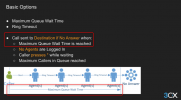
Maximum queue wait time is the maximum amount of time a CALLER will be in the queue, waiting for their call to be answered. The default is 1800 seconds, so half an hour. If they remain in the queue for this amount of time, their call will then be forwarded to the Destination if no Answer.


The Ring Time is the amount of time the agents will ring, each time it is their turn to ring.

You could also have "Hunt by Threes Prioritized" as the polling strategy, so 3 agents ring at once, or "Ring All" so all the available agents will ring at the same time.

From the 3CX Academy:

1654243203372.png

Speaker notes:

The “Maximum Queue Wait Time” is the amount of time a caller will remain in the queue until the call times out and goes to the Destination if no Answer.

It will ring each agent for the configured ring time, according to the polling strategy chosen, until the Maximum Queue Wait Time is reached. If, within that time an agent does not answer the call, the call will be transferred to the Destination if no Answer.
 
Then you will be stuck with the 15 second timer as lowest value wich is by 3cx design.
And that is what I don't understand. In Avaya I could set it to 1 second, but 3cx lowest is 15 seconds ... I don't get why there's a minimum of 15 seconds. It affects my customers that have to wait for too long time - unnecessary.
 
And that is what I don't understand. In Avaya I could set it to 1 second, but 3cx lowest is 15 seconds ... I don't get why there's a minimum of 15 seconds. It affects my customers that have to wait for too long time - unnecessary.

Think of the Call Queue as a room. The Maximum Queue Wait Time is the amount on time the caller will remain in the room, waiting for their call to be answered, NOT the amount of time it rings on the agents!

I think you have misunderstood what this metric actually is. Please see my previous post for an explanation.
 
Think of the Call Queue as a room. The Maximum Queue Wait Time is the amount on time the caller will remain in the room, waiting for their call to be answered, NOT the amount of time it rings on the agents!

I think you have misunderstood what this metric actually is. Please see my previous post for an explanation.

If we take the room example, then I want John and Jane to be in the room at first - after 6 seconds (maximum) I want Michael to enter the room and again 6 seconds later Dianna to enter the room.

Here is what I'm trying to do, which were very easy with Avaya....
  • Call queue A (Front end - ie. 1st level):
    John, Jane

  • Call queue B (2nd level):
    John, Jane, Michael

  • Call queue C (3rd level):
    John, Jane, Michael, Dianna
John and Michael is already talking on the phone, Jane is not at her desk, but she has forgotten to set status to "Away", so she is "Available", but not answering. Dianna is ready to answer the phone.

So this is the flow I want...
  1. Customer calls "Call queue A"
  2. Since John is talking and Jane is not at her desk, I want it to overflow after 6 seconds to "Call queue B"
  3. Since John and Michael is talking - and Jane is "Available", but still not answering, the call must overflow to "Call queue C" after 6 seconds.
  4. Diana picks up the call - the customer has waited 12 seconds.
Of course we have many more people in our real queues :)

But how can I achieve the above, when the minimum of "Maximum Queue Wait Time" is 15 seconds?

I set "Polling Strategy" to "All" (since I want John and Janes phones to call at the same time), then if I set "Ring time" to 6 seconds and "Maximum Queue Wait Time" to 1800, then the customer stays in the same group until 1800 seconds.
 
Goodmorning,

Since the default minimum value of 15 seconds cant be altered there is no way around this.
you could try and put them in a ring group wich has a ring timer that can be set to 6 seconds after wich it can overflow to an alternate destination, but then again you would lose queue functions.
 
Goodmorning,

Since the default minimum value of 15 seconds cant be altered there is no way around this.
you could try and put them in a ring group wich has a ring timer that can be set to 6 seconds after wich it can overflow to an alternate destination, but then again you would lose queue functions.
But if I put them in a ring group, they can't log them self in and out right?

I don't get why 3CX has a minimum of 15 seconds? In Avaya I had no minimum. I don't get why this was so easy for me in Avaya and in 3CX it's a huge problem for us (and our customers). 3CX should be way ahead of Avaya.
 
They cant log themselves in and out of the ring group but they can switch status as to not get calls for example.

Every system has their own designs and specs so offcourse there is going to be differences.
 
They cant log themselves in and out of the ring group but they can switch status as to not get calls for example.

Every system has their own designs and specs so offcourse there is going to be differences.

Of course ... and in almost all parts, 3CX is way ahead of Avaya ... except this single and important limitation. If my customers have to wait 30 seconds in contrast to 12 seconds is a pretty huge difference. Has 3CX given a reason why there's a minimum of 15 seconds?
 
How long do you want your agents to ring?
 
How long do you want your agents to ring?
I want my agents to ring for as long as it takes for the call to be answered.

An example:
When a customer calls, "John and Jane" phones rings simultaneously. After 6 seconds, I want Michael's phone to ring too. After further 6 seconds, I want Diannas phone to ring too - after this I want the 4 phones to keep ringing until call is answered.,
 
No. So this is where you have misunderstood.

You define the amount of time you want an agent to ring. Because when you have agents in a list, you want them to ring for a specified amount of time.

For example every agent will ring 30 seconds each, in sequence as it moves on down the list.

If they are going to ring all at the same time, this will ring all of them in 30 second cycles. As they are all going to be ringing at the same time, this will essentially have them ringing continuously. Same users, multiple cycles.

The minimum amount of time the agent will ring is 5 seconds, given that the PBX has to send the call to the user and actually ring the phone.

The maximum queue waiting time is how long the caller will be in the queue and ringing to the agents. So the minimum time it will have to ring all the agents IN TOTAL is 15 seconds. Your agents will have to answer the phone call within 15 seconds otherwise it will go to the destination if no answer. This will result in an abandoned call for the queue.

We do not do cascaded calls in our queues.

The closest to what you want is with Skill Based Routing, where you will have your agents with their relevant skill set (1-5)

Skill set 1 agents will ring until they answer the phone.

Skill set 2 agents will only ring if agents in skill set 1 are on the phone or logged out from the queue.
 
No. So this is where you have misunderstood.

You define the amount of time you want an agent to ring. Because when you have agents in a list, you want them to ring for a specified amount of time.

For example every agent will ring 30 seconds each, in sequence as it moves on down the list.

If they are going to ring all at the same time, this will ring all of them in 30 second cycles. As they are all going to be ringing at the same time, this will essentially have them ringing continuously. Same users, multiple cycles.

The minimum amount of time the agent will ring is 5 seconds, given that the PBX has to send the call to the user and actually ring the phone.

The maximum queue waiting time is how long the caller will be in the queue and ringing to the agents. So the minimum time it will have to ring all the agents IN TOTAL is 15 seconds. Your agents will have to answer the phone call within 15 seconds otherwise it will go to the destination if no answer. This will result in an abandoned call for the queue.

We do not do cascaded calls in our queues.

The closest to what you want is with Skill Based Routing, where you will have your agents with their relevant skill set (1-5)

Skill set 1 agents will ring until they answer the phone.

Skill set 2 agents will only ring if agents in skill set 1 are on the phone or logged out from the queue.

Thank you for your explanation.

Our most important task is to answer our customers as quick as possible (with regards to three levels of agents), regardless of how long the agent rings.

Skill based routing does not work for us. If an agent has left his desk and forgot to set "Away" status / log out of queue, the call will never reach Skill level 2 - again the customer will have to wait unnecessary.

In Avaya we could create groups and overflow to other groups in a few seconds. Sadly we see that our customers are waiting longer for their calls to be answered in 3CX than in Avaya .. I deeply hope this will be fixed in the future.

All this could be solved by removing the minimum in "Maximum wait time" - like in Avaya.
 
I understand your concern, but not everyone answers their calls quickly, so they need a chance to process a larger list of agents.

Why don't you try using the Hunt by Threes - Prioritized.

This will ring three agents at a time in sequence.

So in the 1st Cycle these agents will ring

  • John
  • Jane
  • Michael
2nd Cycle:
  • Dianna
  • John
  • Jane
3rd Cycle
  • Michael
  • Dianna
  • John
And so on.
 
Status
Not open for further replies.

Forum statistics

Threads
111,974
Messages
590,083
Members
164,900
Latest member
Silent_Guru