"Meeting has not started yet. Retry later." After migration and upgrade

Status
Not open for further replies.

Basetek

Premier Customer
Joined
Mar 13, 2020
Messages
8
Reaction score
4
Hi Folks,

Over the weekend I upgraded out 15.5 Windows server to a 16.0.504 Linux VM. This all went well and most things seem to be working just fine.

Before the upgrade we were using WebMeeting extensively without any issues. We have friendly aliases for each extension and a user could simply click the "Start a 3CX WebMeeting Now" button in their Windows client and everyone else just clicked their friendly URL and joined the meeting.

Since the upgrade, users can start a meeting (either in the Windows client or from the Webclient) but users joining the meeting receive the "Meeting has not started yet. Retry later." message (web or apps).

I have tried restarting the services then waiting a while and checked that our licence is still bound to our FQDN (which it appears to be in the customer portal).

Anyone have any ideas please? This is a pretty crucial feature for us, used daily.

Regards,

Richard.
 
So, the plot thickens.

It would seem that meeting links using the:
Code:
https://<dashed fqdn>.3cx.net/open/<random id>
syntax work fine.

But links using:
Code:
https://<dashed fqdn>.3cx.net/webrtc/join/<random id>
or
Code:
https://<dashed fqdn>.3cx.net/join/<friendly name>
syntax, do not work.

Any help or suggestions much appreciated.
 
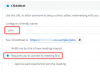
See the parameter
Requires you to connect to meeting first
 
Hi Paurus,

Yes, we've been using it fine for ages.

So I have been playing around some more and it seems that the friendly name to quick meeting URL must be cached on the 3CX server side.

If I change my extension's friendly name, it all works as expected.

Now need to find out how to get 3CX to clear the cache their end (assuming I'm right).

Reagrds,

Richard.
 
Richard, are you referring to the Click2Meet URL of your own extension for example?

This does indeed have requirements as circled below:
1586180817582.png
You also need to have an email address on your extension.


Before anyone can use my URL, I need to login to my Webclient, and click Webmeeting, then click Join.
Once I'm in the meeting, any person using my Click2Meet URL will also be able to join me otherwise they will be informed that the meeting has not yet started.
 
Hi John,

Thanks for your reply, but we've been using this for ages in the way you describe and if I change my friendly name (add a 2 at the end) then everything works.

The issue seems to be that the translation between friendly name URL and underlying quick meeting URL is being cached somewhere and is still pointing to a meeting that can no longer exist.

My problem now, is that I don't want to change all my users friendly names and can't resolve the issue from my end.

Are the MCU's caching friendly names? Can it be cleared for our FQDN?

Regards,

Richard.
 
Would you like to send me a Click2Meet URL that has the problem so we can take a look?

Obviously, don't change it's friendly name, we need one that is known to be problematic. ie:

- User opens webclient
- User clicks Webmeeting, then Join
- Guest enters Click2Meet URL of that specific extension
- Guest gets "Meeting has not started yet. Retry later" when they click log in
 
Thanks John, have sent you a message! (Will post results back here for others future reference)
 
For the benefit of future forum readers, this was an edge case probably related to the migration/upgrade process. 3CX support were able to reset our meetings and everything started working again.

If you're definitely in the same situation then please contact 3CX support, they are very helpful indeed!
 
  • Like
Reactions: B0Ni
Status
Not open for further replies.

Forum statistics

Threads
111,973
Messages
590,078
Members
164,896
Latest member
sameage