Meeting has not started yet

Status
Not open for further replies.

AlexanderP

Free User
Joined
Apr 10, 2020
Messages
5
Reaction score
1
After update to v.18 I can start webmeeting or plan Conference.
But anyone I sent the link get only "Meeting has not started yet" message.
No matter which browser or device.
Also if I invite from the meeting (so I'm certainly on and "meeting has started").
WHat can be the problerm/solution?
 
Hi @AlexanderP

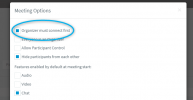
If you're seeing "The Meeting has not started yet", it's due to the settings selected when setting up a Webinar. In the settings (the wrench next to Webinar) you've left the option 'Organizer must connect first' checked. Disable it and it won't happen again.

1618929536816.png

Note: Also make sure you're on V18 Alpha 3, and reschedule the meetings.
 
Last edited:
I do it also from inside the conference or a Webmeeting.
So I'm organizer and I'm connected.
But the one's I'm sending invite (or myself from the phone) get this message.

By the way - where are these meeting options? I don't see it in the webclient
 
Hi @AlexanderP,

Try and upgrade to V18 Alpha 3 and reschedule the meetings.

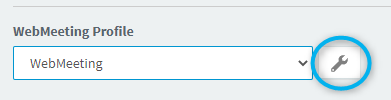
The options will appear in the webclient under WebMeeting Profile as shown below:

1618930779760.png
 
UPDATE: I found the setting and after checking out "Organizer must connect first"or something like that it worked.
It remains strange that it doesn't work when I'm as organizer logged in.
And the option Webmeeting doesn't have this choice.
 
Last edited:
there are two links, yours as Host you find in the WebClient and is different to the one you sent out or saved in your calendar.
 
Status
Not open for further replies.

Forum statistics

Threads
111,973
Messages
590,078
Members
164,896
Latest member
sameage