Mercury CRM integration

Status
Not open for further replies.

robausirl

Gold Partner
Advanced Certified
Joined
Nov 26, 2020
Messages
28
Reaction score
5
Hi All,

I've got anew client that is using the below API. I've managed to simulate a test with postman and can confirm access and pull test data so I know my API key etc is working.

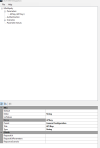
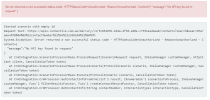
I'm struggling with the 3CX Template Generator portion as I've followed all the prompts and seem to have hit a wall and getting a response stating "message":"No API key found in request". I've not had to enter the API key as yet so I'm sure it's a config issue but i'm not sure on how to format the request using the generator so I can test etc. From reading the API documentation it seems to want the format of x-api-key:keyvalue with keyvalue being the API key I've been provided by the vendor.

https://wiki.connective.com.au/en/articles/633-getting-started-with-mercury-api

Any and all help is greatly appreciated so I can wrap my head around this and get a test working.

Kind Regards,
Rob
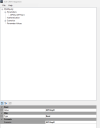
 

Attachments

  • Screenshot 2023-05-02 215923.png
    Screenshot 2023-05-02 215923.png
    16.5 KB · Views: 6
  • Screenshot 2023-05-02 215910.png
    Screenshot 2023-05-02 215910.png
    21.1 KB · Views: 6
  • Screenshot 2023-05-02 215807.png
    Screenshot 2023-05-02 215807.png
    26.6 KB · Views: 6
As you stated in your reply on May 2nd the CRM provider is expecting the key in the header. I've done that so why should I need to also define a parameter? I would have thought based on my reading that if I choose to define the key in the header I no longer need to worry about the parameter portion of the code? Hence why I removed it.

Upon testing in Postman I can confirm I can read the CRM database and perform GET commands when sending the API key in the header. I can extract test data in the CRM without issues.

I can get this working in Postman without an issue so my issue is how to format 3CX XML file and get it working. As this is my first time trying this I would appreciate a little further guidance, remembering I'm not a developer and I'm learning this. As I've said previously I've gotten out of the box templates for ZenDesk and ConnectWise working so I understand the concept and I'm just struggling on the syntax formatting and how to correctly populate my XML file.

Perhaps 3CX just can't process what i'm trying to do?
 
As you stated in your reply on May 2nd the CRM provider is expecting the key in the header. I've done that so why should I need to also define a parameter? I would have thought based on my reading that if I choose to define the key in the header I no longer need to worry about the parameter portion of the code? Hence why I removed it.
Sorry, I didn't see the history of the thread again. That's correct, you need to provide the header in the request, as you're doing. But you also need to change the Authentication element to "No", because you're not using basic authenticaiton as you're stating. So you need to specify this:
XML:
<Authentication Type="No"/>
 
  • Like
Reactions: Evolute IT
Sorry, I didn't see the history of the thread again. That's correct, you need to provide the header in the request, as you're doing. But you also need to change the Authentication element to "No", because you're not using basic authenticaiton as you're stating. So you need to specify this:
XML:
<Authentication Type="No"/>
I've changed my authentication type to the below ut get an error stating the XML file is invalid,

<Authentication Type="No"/>
</Authentication>

I'm thinking it's because after the "No" there is a forward slash i.e. / so I've removed that and it now allows me to upload the XML file. However I'm still getting the attached error as if it's not recognising my API key...
 

Attachments

  • Screenshot 2023-05-16 094405.png
    Screenshot 2023-05-16 094405.png
    48 KB · Views: 2
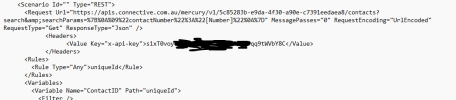
See additional screenshots of both a test from Postman and then my XML file for 3CX. Not sure what i'm missing now but still not working...
 

Attachments

  • Screenshot 2023-05-16 192257.png
    Screenshot 2023-05-16 192257.png
    28 KB · Views: 3
  • Untitled.png
    Untitled.png
    11.8 KB · Views: 4
<Authentication Type="No"/>
</Authentication>
You're closing the Authentication element twice. You can use:
XML:
<Authentication Type="No">
</Authentication>

Or:
XML:
<Authentication Type="No"/>

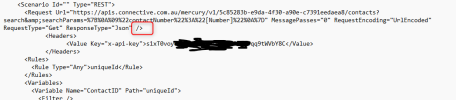
The issue you're having is that you're putting the Headers out of the request. This is your screenshot:
1684234284224.png

That slash causes that the Request element ends there. You need to remove it, and add the closing </Request> tag after the headers.
 
  • Like
Reactions: Evolute IT
You're closing the Authentication element twice. You can use:
XML:
<Authentication Type="No">
</Authentication>

Or:
XML:
<Authentication Type="No"/>

The issue you're having is that you're putting the Headers out of the request. This is your screenshot:
View attachment 35514

That slash causes that the Request element ends there. You need to remove it, and add the closing </Request> tag after the headers.
Yep that makes perfect sense. I've fixed that up and I can now see the CRM call being made and data coming back. Thank you for that info.

I'm seeing the data come back but 3CX is stating it's not able to find a match... I can clearly see the test data for the number i'm testing with coming back so I know it's pulling the data from the CRM, however 3CX is not happy with the formatting. How can I have 3CX match the data in my XML correctly? See attached log from 3CX on a test call I performed to see what it did.
 

Attachments

I your rules you're specifying the node uniqueId, that's what 3CX will use to identify each record. However, the response is the following:
JSON:
{
   "totalCount":1,
   "count":1,
   "offset":0,
   "volume":0.0,
   "results":[
      {
         "uniqueId":"ce555726-e10c-4e60-859d-55b39fd933bd",
         "company":"P200484",
         "isDeleted":false,
         "createdOn":1648594241000,
         "firstName":"Test",
         "lastName":"User",
         "middleName":"",
         "salutation":"Test",
         "motherMaidenName":"Test 123",
         "title":"Mr",
         "occupation":"",
         "employer":"Test Company 1",
         "jobTitle":"Test Job",
         "maritalStatus":"Married",
         "driversLicenceNumber":"123456789",
         "driversLicenceState":"NT",
         "gender":"M",
         "dateOfBirth":608846400000,
         "dateOfBirthDisplay":"54/06/2006",
         "employmentStatus":"Self-Employed",
         "employmentCommenced":"2021-01-04",
         "phoneDisplayType1":"Home",
         "phoneDisplayType2":"Mobile",
         "phoneDisplayType3":"Business",
         "phoneDisplayType4":"Business Fax",
         "homePhone":"",
         "businessPhone":"",
         "mobile":"0412345678",
         "email":"[email protected]",
         "personDataType":"Display",
         "notes":"<html>\n <head></head>\n <body></body>\n</html>",
         "relationshipManager":"CA44000",
         "annualSalary":11560,
         "abn":"",
         "numberOfDependents":0,
         "doNotMail":false,
         "syncToDMH":false,
         "funambolUsers":"CA44000",
         "markAsPrivate":false,
         "importDocumentId":"",
         "partnerName":"Test Partner",
         "emailBounced":false,
         "webPassword":"",
         "webAccess":false,
         "relationshipManagerName":"Test Guy",
         "lastUpdated":1675124278000,
         "contactMethods":[
            
         ],
         "incomes":[
            
         ],
         "expenses":[
            
         ],
         "addresses":[
            
         ],
         "categories":[
            
         ],
         "identifications":[
            
         ],
         "employments":[
            
         ],
         "countryOfResidency":"AU",
         "citizenshipCountry":"AU",
         "residencyStatus":"Citizen",
         "isPermanentResident":true,
         "companyType":"",
         "companyRegisteredIn":"",
         "salutationOrFirstName":"Test",
         "fullName":"Test User"
      }
   ]
}

So you should specify results.uniqueId. You need to adjust this for the variables mapping as well.
 
  • Like
Reactions: Evolute IT
I your rules you're specifying the node uniqueId, that's what 3CX will use to identify each record. However, the response is the following:
JSON:
{
   "totalCount":1,
   "count":1,
   "offset":0,
   "volume":0.0,
   "results":[
      {
         "uniqueId":"ce555726-e10c-4e60-859d-55b39fd933bd",
         "company":"P200484",
         "isDeleted":false,
         "createdOn":1648594241000,
         "firstName":"Test",
         "lastName":"User",
         "middleName":"",
         "salutation":"Test",
         "motherMaidenName":"Test 123",
         "title":"Mr",
         "occupation":"",
         "employer":"Test Company 1",
         "jobTitle":"Test Job",
         "maritalStatus":"Married",
         "driversLicenceNumber":"123456789",
         "driversLicenceState":"NT",
         "gender":"M",
         "dateOfBirth":608846400000,
         "dateOfBirthDisplay":"54/06/2006",
         "employmentStatus":"Self-Employed",
         "employmentCommenced":"2021-01-04",
         "phoneDisplayType1":"Home",
         "phoneDisplayType2":"Mobile",
         "phoneDisplayType3":"Business",
         "phoneDisplayType4":"Business Fax",
         "homePhone":"",
         "businessPhone":"",
         "mobile":"0412345678",
         "email":"[email protected]",
         "personDataType":"Display",
         "notes":"<html>\n <head></head>\n <body></body>\n</html>",
         "relationshipManager":"CA44000",
         "annualSalary":11560,
         "abn":"",
         "numberOfDependents":0,
         "doNotMail":false,
         "syncToDMH":false,
         "funambolUsers":"CA44000",
         "markAsPrivate":false,
         "importDocumentId":"",
         "partnerName":"Test Partner",
         "emailBounced":false,
         "webPassword":"",
         "webAccess":false,
         "relationshipManagerName":"Test Guy",
         "lastUpdated":1675124278000,
         "contactMethods":[
           
         ],
         "incomes":[
           
         ],
         "expenses":[
           
         ],
         "addresses":[
           
         ],
         "categories":[
           
         ],
         "identifications":[
           
         ],
         "employments":[
           
         ],
         "countryOfResidency":"AU",
         "citizenshipCountry":"AU",
         "residencyStatus":"Citizen",
         "isPermanentResident":true,
         "companyType":"",
         "companyRegisteredIn":"",
         "salutationOrFirstName":"Test",
         "fullName":"Test User"
      }
   ]
}

So you should specify results.uniqueId. You need to adjust this for the variables mapping as well.
Yep that did the trick and I got it working. I've created a template so others can use this in the future. See attached.

Thanks very much for your help Ernesto :)
 

Attachments

Status
Not open for further replies.

Latest Posts

Forum statistics

Threads
112,322
Messages
591,886
Members
165,469
Latest member
footandankle.my3fcx.us