Solved Microphone has stopped working on all computers

Status
Not open for further replies.

Sepultura

Forum User
Joined
Jun 17, 2019
Messages
66
Reaction score
5
Hi,

I've got a major issue with the Windows app: the microphones have stopped working. So far as I can tell all of our computers (Lenovo, HP, Acer, ...) are affected and also all microphones/headsets (laptop built-in, Jabra/Plantronics/Sennheiser headsets, cheap chinese brand headsets).

Using the 3CX web interface in Edge (Chromium) and Firefox works fine. Also no issues in other apps.

Maybe this has started with some app updates in the last weeks (currently 16.3.0.198). Are older versions available (from 3 month ago)? Any other ideas?
 
Have you tried it offsite? With a not company managed device in a non company network?
 
Hi, I do not have a non-company Windows PC available. I've tested a company PC in a non-company network without luck.
You probably think it's firewall related (no outgoing audio connection)?
 
The Options from my current knowledge are:
  • wrong microphonedriver (but would only make sense if everyone usses the same or a similar setup)
  • Group policy with misconfiguration

  • Firewall issue (
  • UDP9000-10999 (default)3CX Media Server (RTP) – WAN audio/video/t38 streamsYes – if you intend on using remote extensions or a VoIP Provider
    but i do not think that it is a firewall issue, unless the 3CX is offsite(not in the same lan))
 
OK, I've noticed we did not have rules for the Windows firewall. Therefore I've added rules to AD for:
  • Allow all connections in/out for "C:\ProgramData\3CXPhone for Windows\PhoneApp\3CXWin8Phone.exe"
  • Allow all connections out to our 3CX PBX IP address
No luck.

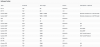
I've also checked the inbound rules on the 3CX server, which look fine to me:
3cx-inbound-firewall-rules.png

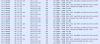
I've ha a look on Wireshark when doing a call with the Windows app. The connection looks weird:
3cx-win-app-wireshark.png
Local IP 10..., 3CX IP 18...
Incoming traffic is TCP from 3CX port 5090, outgoing are only some UDP packets to 3CX UDP port 5090.

When doing a call with the web browser all traffic is UDP to 3CX port 10xxx.
 
Got the problem: the 3CX server inbound rules were missing port 5090 UDP! :eek:

Thanks for assistance and pointing me to the firewall problem.
 
Glad to hear that you was able to fix the problem. WinPhone Client normally does not need to have a special firewall rule created manually on the client, should be automatically added.
 
Status
Not open for further replies.

Forum statistics

Threads
112,025
Messages
590,367
Members
164,977
Latest member
jasimbutt82