Microphone not found - 3CX Desktop App - v18u1

Status
Not open for further replies.

voip-toni

Free User
Joined
Nov 13, 2020
Messages
56
Reaction score
15
Hello,
we use 3CX Desktop App 18.5.28 on a Server Running 18.0.234
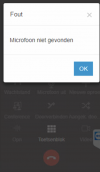
on very second incoming call i get the error message "microphone not found"
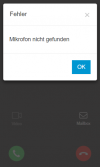
1636992385950.png

I press on OK, sometimes I need to press it 2 times
Afterwards I am able to take the call with the green button without problems
Headset / Microphone works normal.

I use a Jabra Evolve2 65
But I also noticed that error on other devices with the USB Headset Jabra Evolve2 40

Why is it that error shown "microphone not found" although the headset is working normally!?

BR
 
Hi @voip-toni,

Would this machine by chance be running MacOS? If yes, then this is a known issue that will be resolved in update 2.

If no, I'd suggest tryin to uninstall the desktop app and reinstall it.
 
Last edited:
Hello,
No this client uses Windows 10 1909
I tried to uninstall and reinstall the 3cx desktop app bit it did not help.
When I use the webclient in Chrome I don't have this error.

Just for information
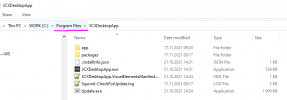
The 3cx Desktop App is not installed in User Profile
1637137257541.png
but it is installed with Admin Account under c:\program files\
 
  • Like
Reactions: Olamide Alao
One of our users is facing the same issue since this morning after connecting a screen with built-in audio device. Setting are correct (to bluetooth headset), reinstall and reboot didn't solve the issue. Calling works perfectly though.

notfound.png
 
Hi @voip-toni and @Vladv,

Does restarting the Desktop App resolve it?

Also, does the popup happen only when switching accounts or is it happening straight from a reboot?

@Vladv, can you select the headset in the options (mic and speaker) rather than leaving it Default?

That's a strange installation location @voip-toni. @Vladv, where is your Desktop App installing to?
 
hy,
I would say c:\program files\<app> is windows default
Installing in the user profie is strange in my opinion. it is only necessary if there is no admin privilege

the error/popup comes when calls come in, not when the app is started

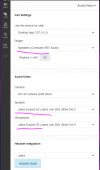
1637141851274.png
I have selected the headset, not default
I also use a different device for RINGER
 
I changed Speaker + Microphone to DEFAULT and I don't have the error/popup anymore!
 
Hi @voip-toni and @Vladv,

Does restarting the Desktop App resolve it?

Also, does the popup happen only when switching accounts or is it happening straight from a reboot?

@Vladv, can you select the headset in the options (mic and speaker) rather than leaving it Default?

That's a strange installation location @voip-toni. @Vladv, where is your Desktop App installing to?

Restarting the app doesn't resolve it.
Changing Mic&Speakers to default does. Changing only the mic doesn't change it. Very strange behaviour, but it's solved by changing the windows defaults.
 
  • Like
Reactions: VasilisV_3CX
Thanks for the update, I'll PM you shortly @Vladv.
 
We are having this exact issue. We have a Jabra 510 speaker and when it's enabled at all - even if it's not selected in the 3CX app - 3CX says "Microphone not found" when someone calls in. Has anyone figured this out yet?
 
Hi @cpcali,

Can you select the Default Mic, not the a Jabra specific one? It should say "Default - Jabra etc". Does that work for you?
 
@cpcali
To add, this will be resolved with the Desktop App that is released along with V18 Update 2, which should be very soon.
 
The default mic was the one selected. I'm glad to hear it's been fixed and we will look forward to seeing V18 Update 2. Where are the releases announced?
 
I upgraded to the beta and sure enough no more prompt. However, in Audio/Video under Settings it says "The current device does not support media settings". Is there a way to roll back?
 
If you uninstall the app you can reinstall the version from your server in the web client.
 
I upgraded to the beta and sure enough no more prompt. However, in Audio/Video under Settings it says "The current device does not support media settings". Is there a way to roll back?
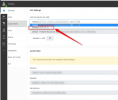
Can you check if you have selected the "Browser" in the drop-down?
1638173164159.png
 
Status
Not open for further replies.

Forum statistics

Threads
112,349
Messages
592,027
Members
165,513
Latest member
megalmazan