


- Joined
- Sep 5, 2024
- Messages
- 58
- Reaction score
- 4
Hi Experts,
We have enabled the Microsoft 365 integration in our 3CX system, allowing users created in Microsoft Entra ID to sync with 3CX. However, we've noticed that the Department field from Microsoft Entra ID does not sync to 3CX.
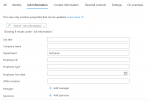
All users imported from Microsoft Entra ID are automatically assigned to the "Default" department in 3CX, even if they are categorized under a different department (e.g., "Technical") in Entra ID. The only details successfully synced are First Name, Last Name, Email Address, and Mobile Number.
Is there a solution to ensure the Department field is properly synced? Any insights would be greatly appreciated!
Thanks in advance!

We have enabled the Microsoft 365 integration in our 3CX system, allowing users created in Microsoft Entra ID to sync with 3CX. However, we've noticed that the Department field from Microsoft Entra ID does not sync to 3CX.
All users imported from Microsoft Entra ID are automatically assigned to the "Default" department in 3CX, even if they are categorized under a different department (e.g., "Technical") in Entra ID. The only details successfully synced are First Name, Last Name, Email Address, and Mobile Number.
Is there a solution to ensure the Department field is properly synced? Any insights would be greatly appreciated!
Thanks in advance!


