- Joined
- Sep 5, 2024
- Messages
- 58
- Reaction score
- 4
Hi Experts,
I've successfully integrated our 3CX system with Microsoft Teams using the Direct Routing feature. However, I'm encountering an issue during the configuration process.
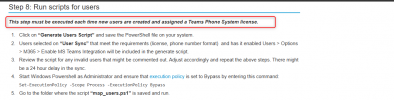
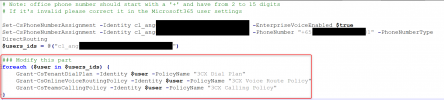
When I execute the dial plan script (Step 3) and the user mapping script (Step 4) in PowerShell, the expected policies — namely the 3CX Dial Plan, 3CX Calling Policy, and 3CX Voice Route — are not being assigned to the users as intended. As a workaround, I’ve had to manually assign these policies to individual users, which then allows the integration to work correctly.
Could anyone advise why the scripts might not be applying the policies automatically? Is there something I might be missing or misconfigured?
Additional Question:
I’m also planning to roll out the integration in phases. For example:
My question is:
Will Teams Direct Routing be automatically applied to these newly added users once they’re synced with 3CX, or will I need to re-run the map_users script from Step 4 in PowerShell each time I onboard a new group?
Your guidance would be greatly appreciated.
Thanks in advance!
I've successfully integrated our 3CX system with Microsoft Teams using the Direct Routing feature. However, I'm encountering an issue during the configuration process.
When I execute the dial plan script (Step 3) and the user mapping script (Step 4) in PowerShell, the expected policies — namely the 3CX Dial Plan, 3CX Calling Policy, and 3CX Voice Route — are not being assigned to the users as intended. As a workaround, I’ve had to manually assign these policies to individual users, which then allows the integration to work correctly.
Could anyone advise why the scripts might not be applying the policies automatically? Is there something I might be missing or misconfigured?
Additional Question:
I’m also planning to roll out the integration in phases. For example:
- Phase 1: 50 users
- Phase 2: 50 users
- Phase 3: 50 users
My question is:
Will Teams Direct Routing be automatically applied to these newly added users once they’re synced with 3CX, or will I need to re-run the map_users script from Step 4 in PowerShell each time I onboard a new group?
Your guidance would be greatly appreciated.
Thanks in advance!